Skip to content

Snipset for Firefox

Type a short keyword in a text field on any web page and Snipset writes the full text. Your clipboard history and AI Chat sit in the Firefox sidebar, one shortcut away.

  • Free account with Google sign-in
  • Firefox 140 or newer on desktop
  • Snippets stay in your browser
  • Freeto install, with a free Snipset account
  • Firefox 140+on Windows, macOS and Linux
  • In your browserwhere your snippet library is stored
  • 4keyboard shortcuts to reach everything
How it works

Ready in three steps

Install it, sign in, and type your first keyword.

  1. Add Snipset to Firefox

    Install it from Firefox Add-ons. It runs on Firefox 140 or newer on Windows, macOS and Linux.

  2. Sign in with Google

    The welcome page opens after install. Sign in on the Snipset website; until you do, the panel shows only the sign-in screen.

  3. Type ;snip and a space

    Create the sample snippet on the welcome page, then type ;snip and a space in any text field. The full text appears in its place.

Features

Everything you reuse, one keyword or shortcut away

Snippets, clipboard history, AI Chat and statistics, all inside Firefox.

Type a keyword, get the full text

Give any text a short keyword. Type the keyword and a space in a text box, search field or rich text editor, and Snipset replaces it with the full text.

  • Works in text areas, text, search, URL and phone fields, and editable rich text
  • Alt+Shift+J opens the snippet menu, so you can search by name and insert without the keyword
  • Variables fill in the date, time, clipboard, selected text, page URL, a prompt, the cursor position, a random pick or another snippet
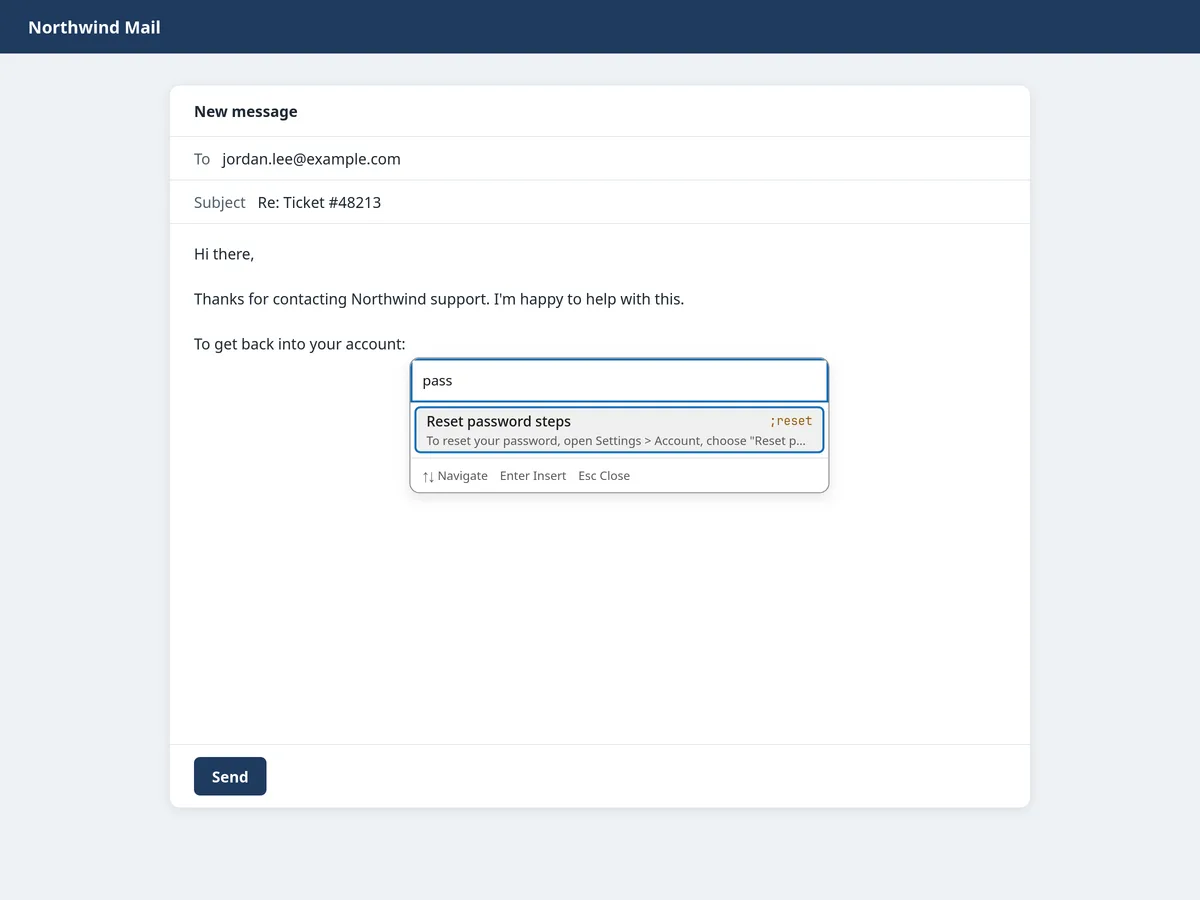
Northwind Mail compose window with the Snipset snippet menu open, searching "pass" and highlighting the Reset password steps snippet with the keyword ;reset

Your snippet library in the sidebar

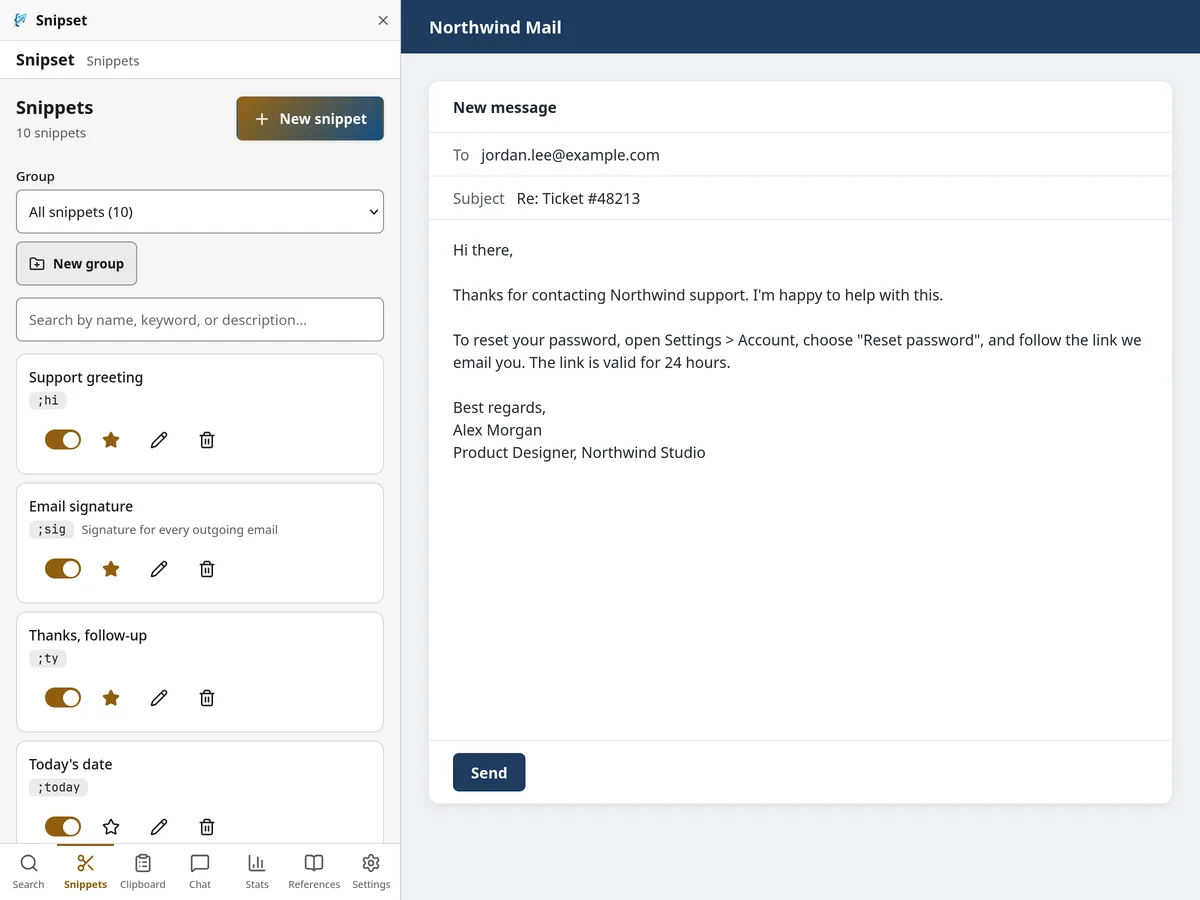
Snipset opens in the Firefox sidebar, next to the page you are writing on. Create, edit and search snippets there without switching tabs.

  • Alt+Shift+S opens the sidebar
  • Groups keep work, support and personal text apart
  • Search by name, keyword or description
Snipset in the Firefox sidebar listing snippets such as Support greeting (;hi) and Email signature (;sig) next to a Northwind Mail reply that uses them

Clipboard history you can search

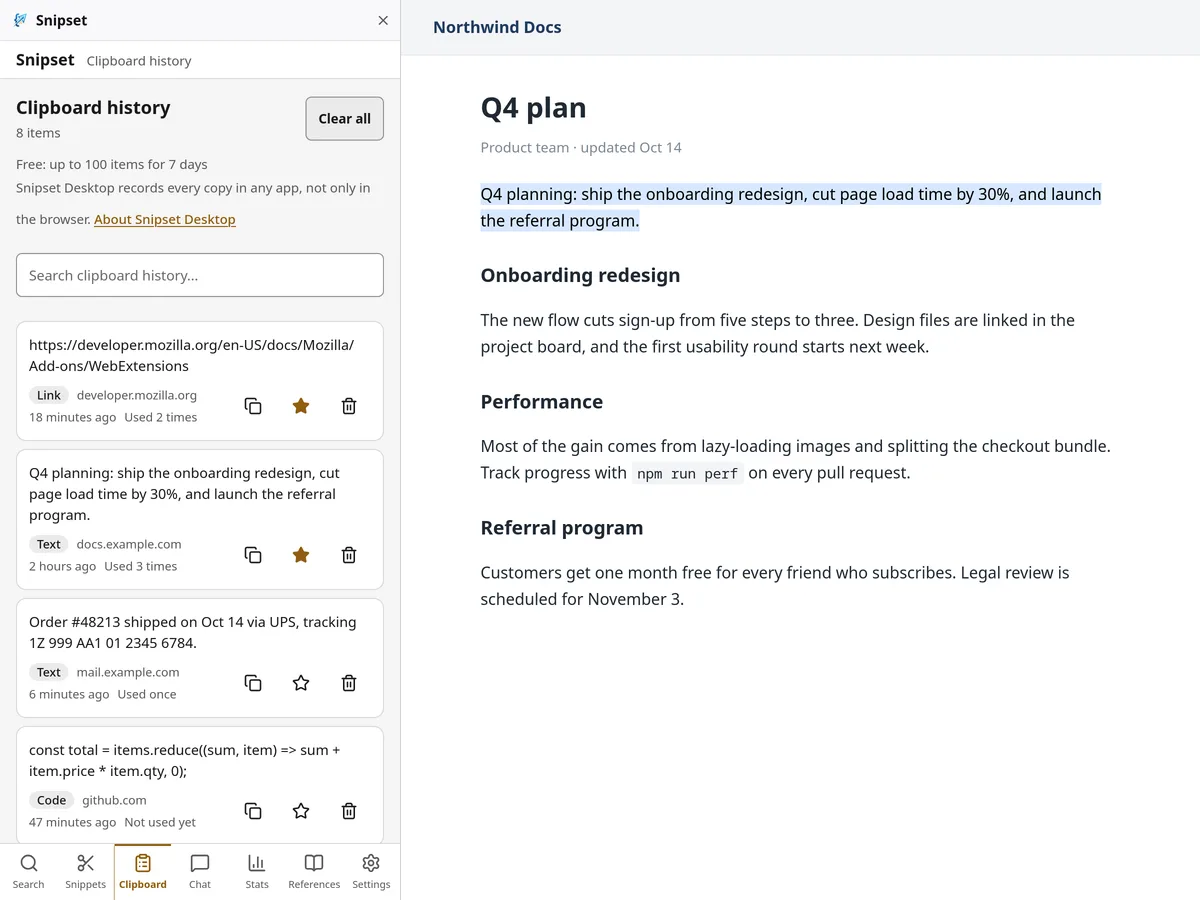
Snipset keeps the text you copy on web pages, so you can find it again and paste it with Alt+Shift+K. Sensitive text such as passwords, card numbers and keys is skipped by default, and nothing is captured in private windows.

  • Free: up to 100 items for 7 days
  • Licensed: up to 1,000 items for 90 days
  • Favorites are never trimmed
Snipset clipboard history in the Firefox sidebar with copied links, text and code, each labeled with the site it came from, beside a Northwind Docs page

AI Chat beside the page

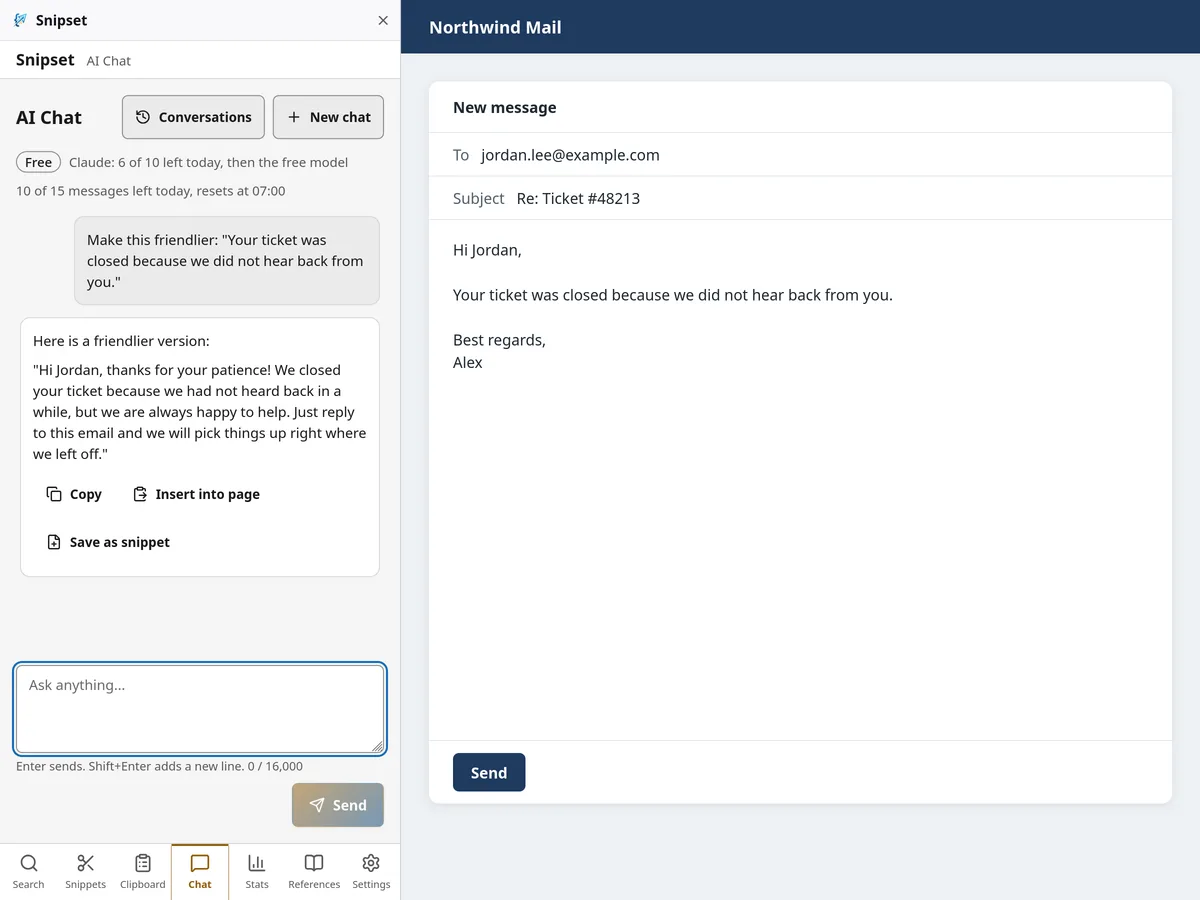
Ask AI Chat to rewrite a reply or answer a question without leaving the tab. Copy the answer, insert it into the page, or save it as a snippet.

  • Copy, insert into the page, or save as a snippet
  • A daily message limit that is higher with a license
  • On Firefox, nothing is sent until you allow it
AI Chat in the Firefox sidebar rewriting a support reply to sound friendlier, with Copy, Insert into page and Save as snippet buttons

See the time you save

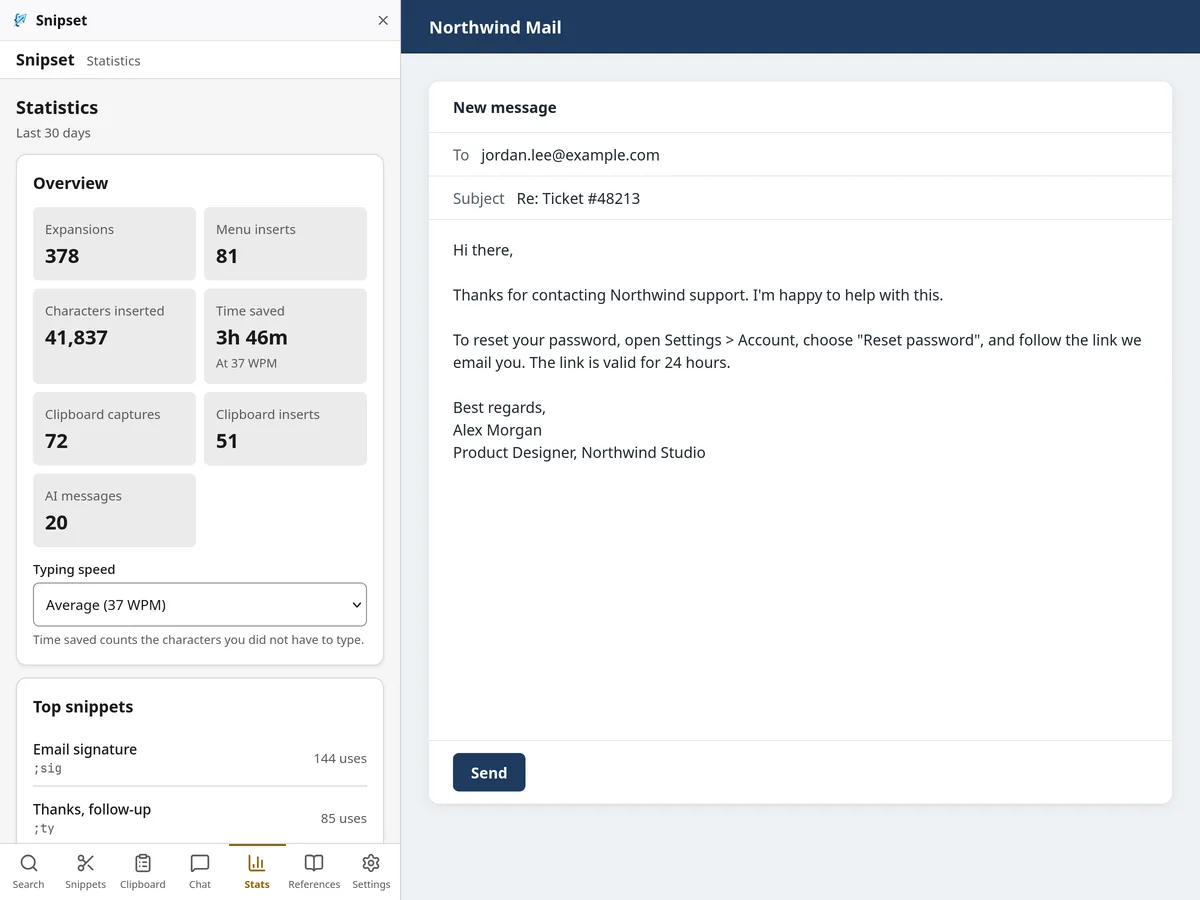
Statistics counts expansions, menu inserts, characters inserted, clipboard captures and inserts, and AI messages, and lists your top snippets. Time saved is the characters you did not have to type, divided by your typing speed.

  • Typing speed is 37 words per minute unless you change it
  • Top snippets show which text you reuse most
  • The counts are stored in your browser
Snipset Statistics in the Firefox sidebar showing expansions, characters inserted, time saved at 37 WPM and the top snippets
Snipset Desktop

Works alone or next to Snipset Desktop

You do not need the desktop app. If you already use it, bring your snippets over and let the two share the work.

Bring your desktop snippets

Import the Snipset Desktop JSON export. When a keyword already exists, choose Keep existing, Replace or Rename. Export back to the same format any time.

Desktop Mode, so nothing expands twice

Desktop Mode hands expansion and copy capture to Snipset Desktop, so nothing expands twice. Your library, search, AI Chat and statistics keep working in Firefox. On Auto it is on for licensed accounts, so if you have a license but no desktop app on this computer, set it to Off in the extension's Settings.

Get Snipset Desktop
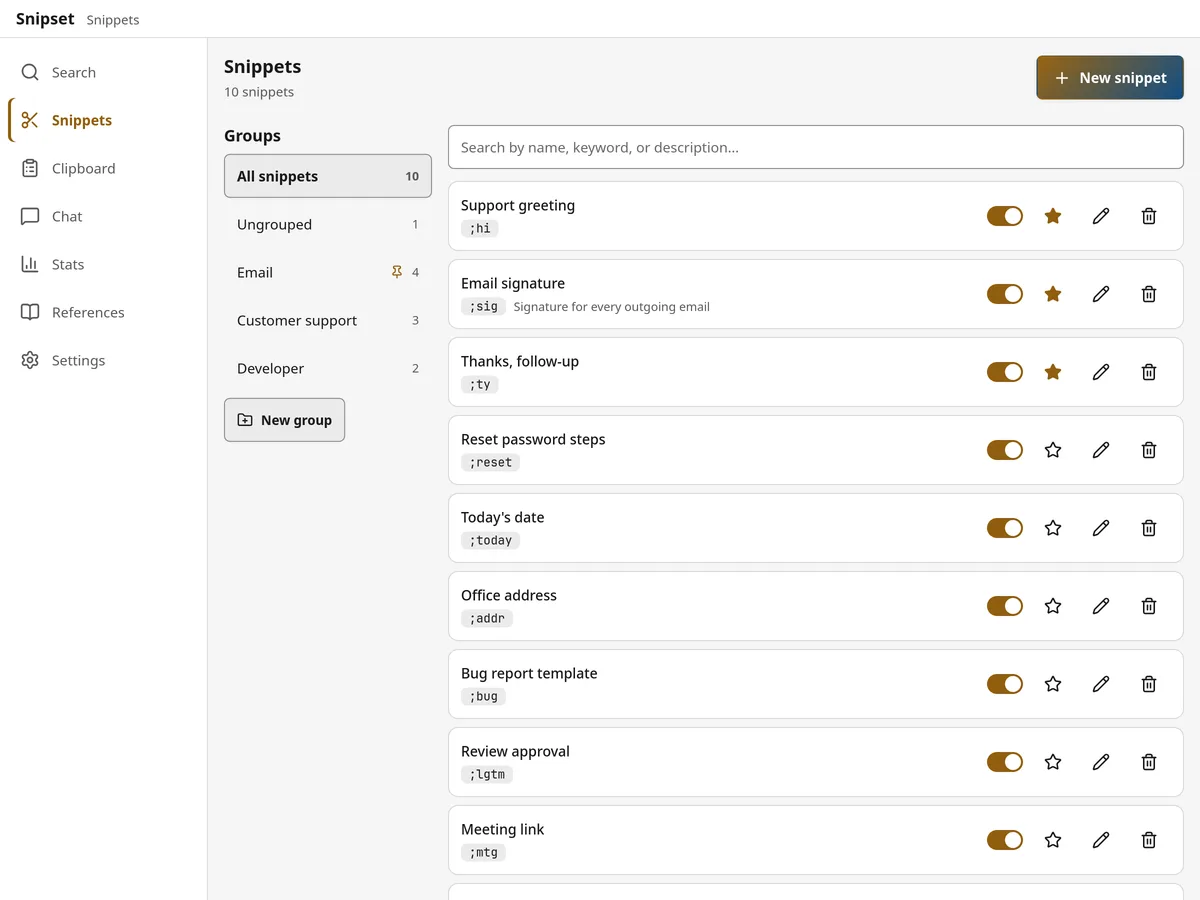
Snipset options page in Firefox showing the snippet library with groups for Email, Customer support and Developer
Privacy

What stays in your browser, and what leaves

Your library lives in Firefox's own storage on your computer. Two things leave it, and only for the reasons below.

Stays in your browser

  • Snippets and groups
  • Clipboard history
  • Usage statistics
  • AI Chat conversations
  • Settings and your sign-in session

Leaves your browser

Your sign-in token
To check your account, to sign out, and with each AI Chat request
AI Chat message text
Only when you send a message. The Snipset server forwards it to Anthropic or Cloudflare Workers AI for the answer.
Keyboard

Four shortcuts to reach everything

Snipset suggests these keys when you install it. If another add-on already uses one, Firefox can leave it unassigned.

Four shortcuts to reach everything
KeysWhat it does
Alt+Shift+SOpen Snipset in the Firefox sidebar
Alt+Shift+JOpen the snippet menu
Alt+Shift+KOpen the clipboard menu
Alt+Shift+XPause or resume expansion on this site

These are default keys. You can change them in Firefox's add-on settings.

FAQ

Questions about Snipset for Firefox

Short answers. The privacy policy and the pricing page have the full details.

Is Snipset for Firefox free?
Yes. Install it and sign in with a free Snipset account. A license raises clipboard history to 1,000 items kept for 90 days and gives AI Chat a higher daily limit.
Which Firefox versions does it support?
Firefox 140 or newer on desktop: Windows, macOS and Linux. Firefox for Android is not supported.
Is there a version for Chrome or Edge?
Not in a store yet. Snipset is listed on Firefox Add-ons, and it is not in the Chrome Web Store.
Do I need Snipset Desktop?
No, the extension works on its own. When Desktop Mode is on, Snipset Desktop does the expanding, so nothing expands twice. On Auto it is on for licensed accounts, so with a license and no desktop app, set Desktop Mode to Off in the extension's Settings.
Where does expansion not work?
Password, email and number fields never expand, and disabled or read-only fields are skipped. Google Docs draws its text on a canvas, so keywords cannot expand there. Firefox also keeps add-ons off its own pages and the Firefox Add-ons store.
What leaves my browser?
Only your sign-in token and the text of the AI Chat messages you send. Everything else stays in Firefox's storage on your computer. The privacy policy has the details.
Can I bring my snippets from Snipset Desktop?
Yes. Export a JSON file from Snipset Desktop and import it in the extension. For keywords that already exist, choose Keep existing, Replace or Rename.

Try Snipset in Firefox

Install it, sign in with Google, then type ;snip and a space.