Template Variables
Template Variables Overview
An introduction to making your snippets dynamic using variables.
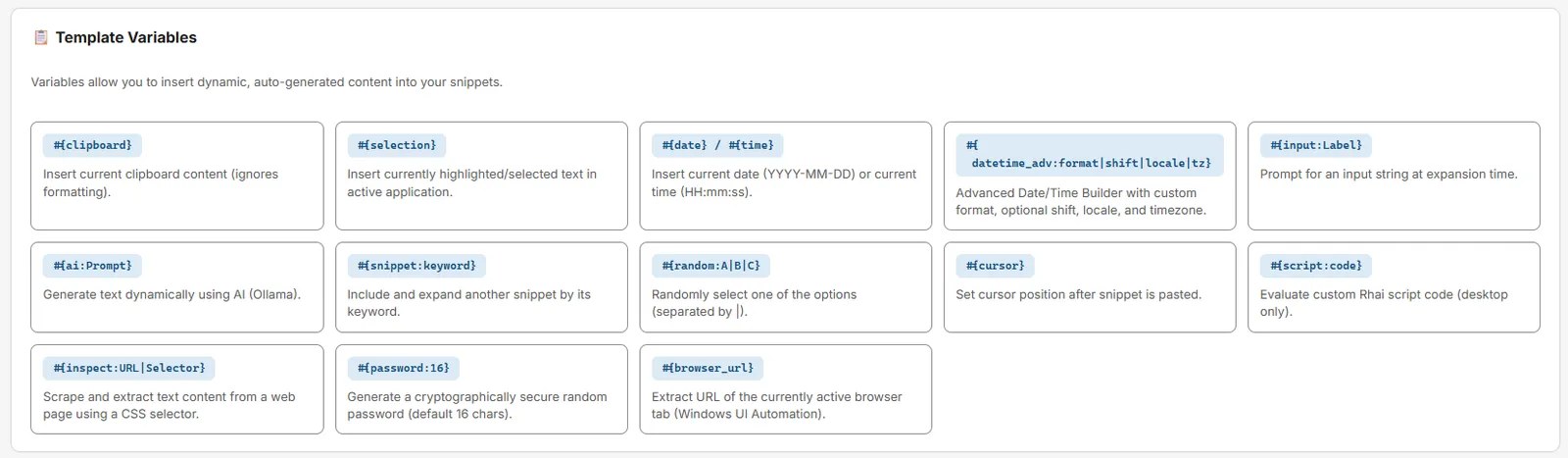
Template variables are what transform Snipset from a simple text expander into a powerful automation tool. By embedding special codes inside your snippet content, you can dynamically insert data, trigger actions, or fetch information exactly at the moment the snippet expands.
What Are Template Variables?
When a snippet expands, Snipset scans the content for variables and replaces each one with its real value at that exact moment.
If your clipboard contains "John": Dear John,
The #{ } Syntax Rule
Every variable in Snipset must follow a strict formatting rule:
- It must start with a hash
#followed immediately by an opening curly brace{. - It must end with a closing curly brace
}. - Variables that take arguments use a colon
:to separate the name from the argument (e.g.,#{date:yyyy-MM-dd}). - Variables are case-sensitive:
#{date}is correct.#{Date}will not work.
Variable Categories
Variables are grouped by function. Click on a category to see its detailed documentation:
| Category | What it does |
|---|---|
| Date & Time | Insert the current date or time with custom formatting and offset math. |
| Text & Clipboard | Paste clipboard contents, capture selected text, and precisely position the cursor. |
| Scripting | Run Rhai scripts for programmatic automation. |
| Interactive | Pick random values, prompt for input, or generate passwords. |
| Input & Prompt | #{input:Label} / #{input:Label|Default}: prompt for a value at expansion time (see Interactive). |
| AI | #{ai:Prompt}: send prompt to Ollama and insert response (requires Ollama). |
| Snippet | #{snippet:keyword}: nest another snippet (max depth 5). |
| Password | #{password} / #{password:16}: generate a password (8–128 chars, Vault generator). |
| Inspect | #{inspect:URL} / #{inspect:URL|Selector}: fetch/inspect web content (browser selector). |
| Browser | #{browser_url}: current browser URL (when available). |
#{clipboard}, #{selection} (empty on Linux), #{cursor}, #{date}/#{time}/#{dateTime}/#{datetime_adv}, #{random:A|B|C}, #{input:Label}, #{ai:Prompt}, #{snippet:keyword}, #{script:code}, #{inspect:URL|Selector}, #{password[:len]}, #{browser_url}.
Combining Variables
You can mix and match variables freely within a single snippet.
On Expansion: [22/04/2026] Re: Project Alpha proposal| (cursor is placed at the end)
Variable Evaluation Order
Variables are evaluated left to right, top to bottom.