Clipboard Mastery for Daily Work
Module 04 of Digital Savvy. Use clipboard history, pinned entries, and formatted paste to stop losing what you just copied.
[Video placeholder. Recording pending. The lesson shows a live clipboard workflow that saves a customer-support agent about 20 minutes per shift.]
What you are probably doing wrong
Most people use the clipboard as a single slot. Copy something, paste it, copy the next thing, paste it, done. If you ever need to copy a second thing before pasting the first, the first one is gone.
This costs more time than people realize. Common patterns it breaks:
- You are writing an email and need to look up a customer number. You copy it, switch tabs, switch back, and the email draft is gone.
- You are assembling a report from three sources. Each time you copy the third thing, the second one disappears.
- You paste a phone number into a form, then need to paste the same number somewhere else. You copy it again.
Clipboard history
A clipboard history tool remembers the last 50 (or 100, or 200) things you copied. You open a panel, pick the one you want, paste. The slot you move from is no longer single-use.
This single feature repays its learning curve inside a week for anyone who works in more than one window at a time.
Pinned entries
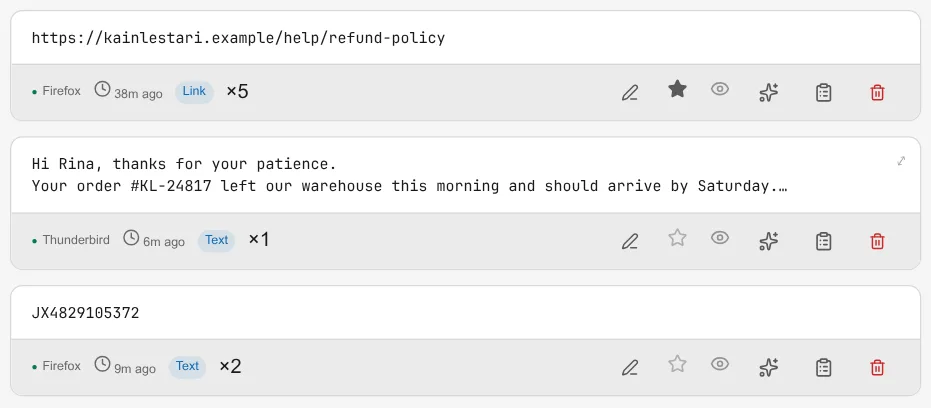
Pinning is the second-most-important feature. Things you copy often (your own address, your customer support email, a long URL you will need tomorrow) can be pinned to the top of the history. They never scroll off.
The discipline is to pin only what you actually reuse. Pinning is for items that come back at least weekly. A one-off link should live in history, not pinned.
Formatted paste
The third feature is "paste as plain text". When you copy from a website, you also copy a pile of fonts and styles. If you paste that into an email or a doc, you bring the formatting with it. The recipient's email client then renders your pasted text in Comic Sans at 24pt and the message reads as if you do not know what you are doing.
Paste-as-plain-text strips the formatting. It is a small thing, but it is the difference between looking professional and looking like a bot.
Exercise: save 20 minutes this week
Pick the most common multi-copy workflow in your day. For support, it is probably "look up customer, switch to reply, paste data". For sales, "copy prospect, switch to CRM, paste, copy again, switch to email". Pick yours.
Run your normal workflow for one day. Note how many times you copy something and immediately lose something else. Tomorrow, use clipboard history for the same workflow. Compare.
Connection to Snipset
Snipset has a clipboard history tool that integrates with the rest of the snippet system. The #{clipboard} variable pulls the current clipboard into an expansion, so you can combine clipboard history with text expansion. Module 06 covers that combination.
What is next
Module 05 moves from typing and copying to time. Date math in messages is where most teams lose hours per week to errors.