Time and Task Strategy
Module 05 of Digital Savvy. Stop hand-counting days. Use date variables so every message gets the deadline right by default.
[Video placeholder. Recording pending. The lesson shows three live expansions that compute a deadline, a follow-up date, and a meeting window.]
Where most date errors happen
The pattern is familiar. You write "let's reconnect next Wednesday" and mean a specific date, but your reader does not know which Wednesday you mean. Or you write "respond within 14 days" and have to count on a calendar. Or you put a meeting reminder in a message and get the day wrong.
None of these are hard problems. They are slow problems, and they compound. Every message with a vague date is a message that requires a follow-up to clarify the date. Multiply by the messages you send per week, and you have a hidden tax.
The mental model
Date variables in a snippet do three things:
- They output a date in a chosen format (e.g. "March 15, 2026" or "15/03/2026").
- They can offset the date (e.g. "today + 14 days").
- They can pick a locale and a timezone, so the message reads correctly for the recipient.
Once you have these in a snippet, you stop counting days in your head. The snippet counts for you, and it never gets tired or distracted.
Three expansions to set up today
Pick the one that matches a real deadline in your week:
;due14→ "Please respond bytoday + 14 days, formatted asMonth D, YYYY." For invoices, refund windows, proposal deadlines.;follow→ "Following up on our chat fromtoday - 3 days." For polite chase messages.;fri→ "Friendly reminder: the meeting is this Friday,next Friday formatted as Day, Month D." For weekly all-hands or team syncs.
Once you have one set up, every message you send that mentions a date is one less text to crack open a calendar for.
Common pushback
"I do not send that many messages with dates."
Track for one day. Most knowledge workers send five to fifteen messages per week with a deadline embedded. The savings scale quietly.
"What if my recipient is in a different timezone?"
The variables handle that. You pick the timezone, the date renders correctly. The model assumes you know which timezone the recipient reads in, which is usually obvious.
How this connects to Snipset
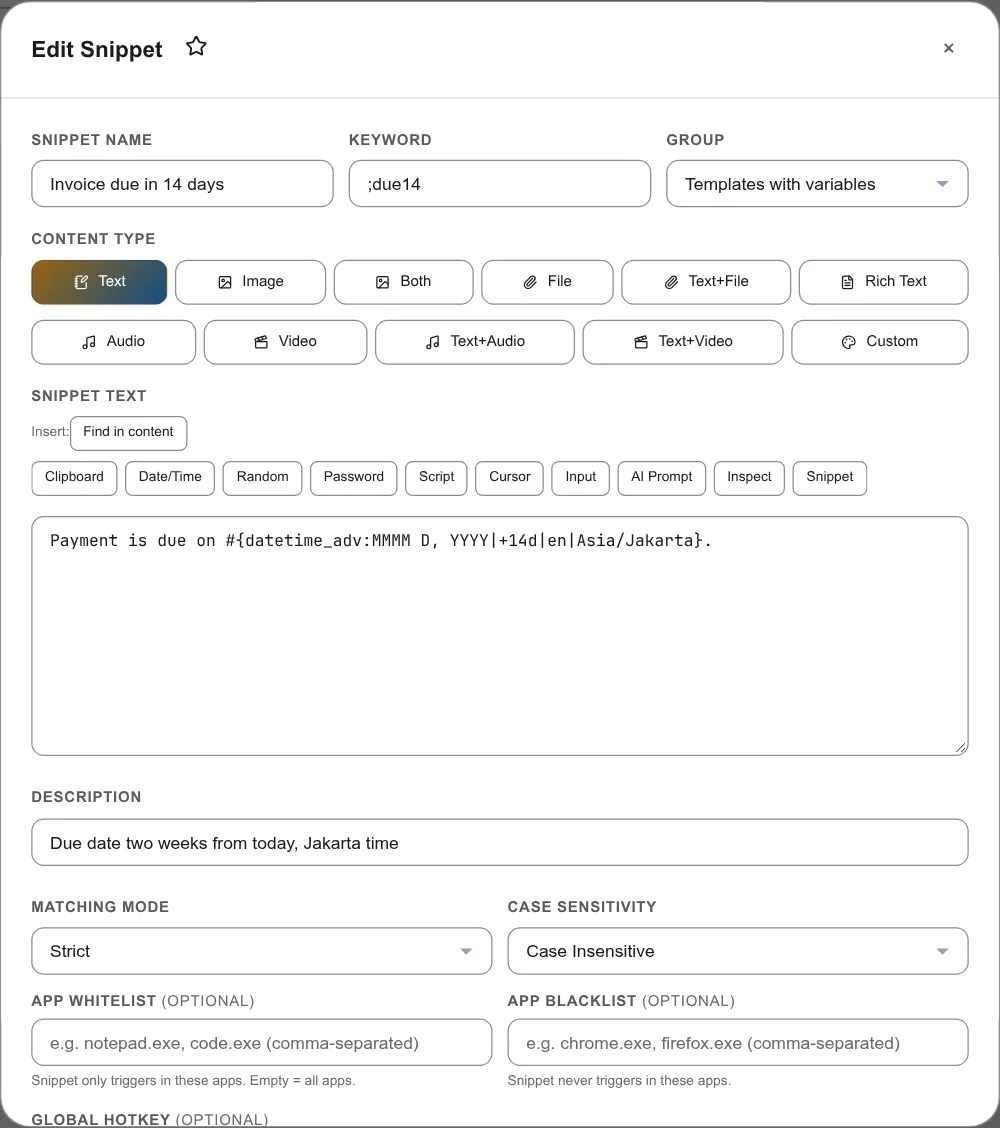
Snipset exposes #{date}, #{time}, #{datetime_adv:format|shift|locale|tz}. The advanced form is the one you want. Example: #{datetime_adv:MMMM D, YYYY|+14d|en|Asia/Jakarta} for an invoice due in two weeks, written in English with Jakarta time.
If you only need today's date as YYYY-MM-DD, the simpler #{date} variable is enough.
Exercise: replace one calendar check
Today, send one message that would normally have required you to count days. Use the date variable. Notice the speed. Tomorrow, send two such messages.
What is next
Module 06 adds the personal layer. Date math handles deadlines. Variables handle "but with this customer's name and that product in it."