Configuration
Pintasan Keyboard
Sesuaikan pintasan keyboard global agar sesuai dengan alur kerja Anda.
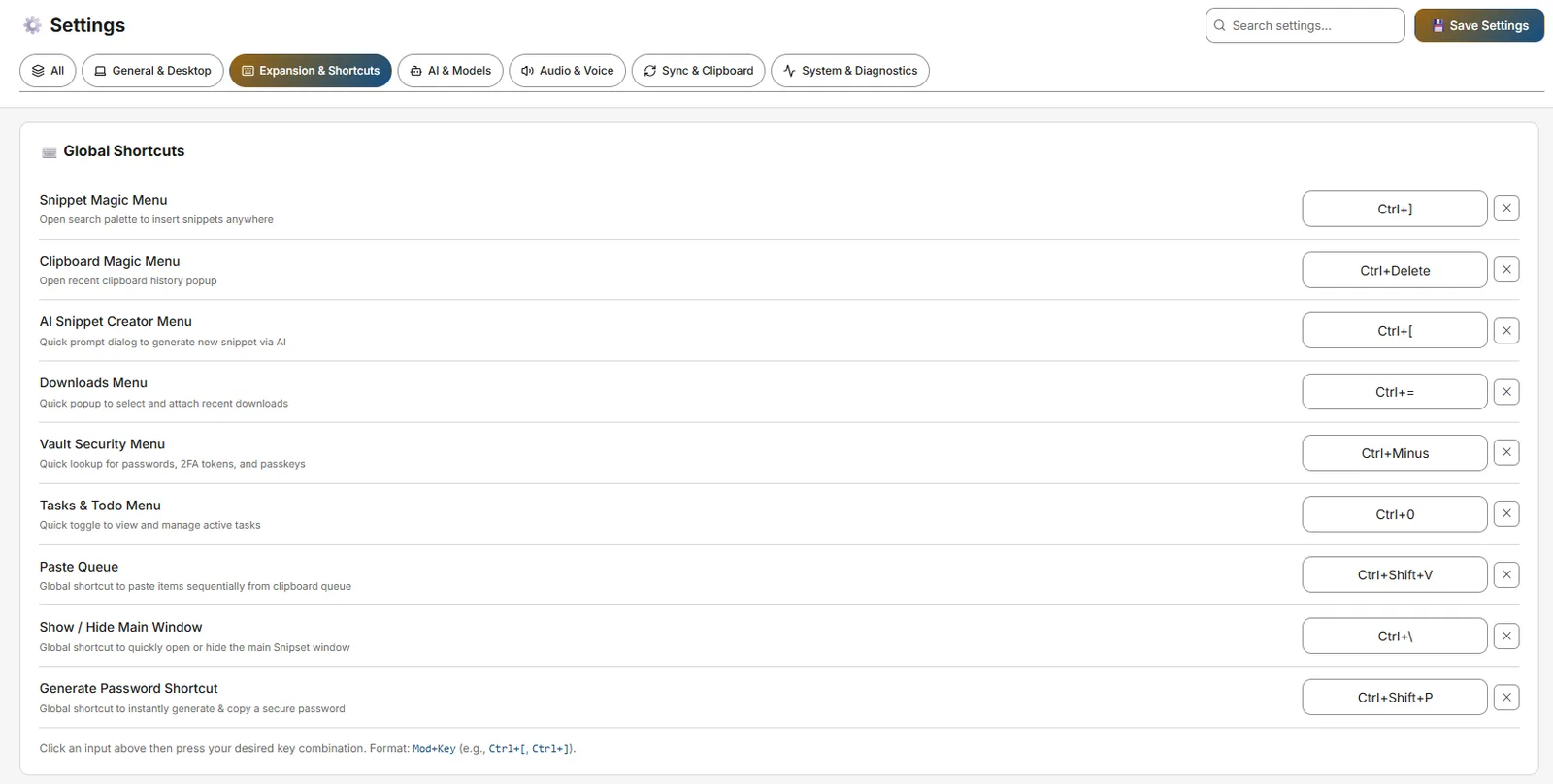
Snipset sangat bergantung pada pintasan keyboard global (hotkey yang berfungsi terlepas dari aplikasi yang sedang aktif di layar Anda). Jika pintasan default bertabrakan dengan perangkat lunak lain yang Anda gunakan, Anda dapat mengubahnya dengan mudah di menu Pengaturan.
Mengubah Pintasan
- Buka Pengaturan Pintasan Arahkan ke Pengaturan → Ekspansi & Pintasan → Pintasan Global di jendela utama Snipset (juga Pengaturan → Audio & Voice untuk dictation/translation/ask-anything/read-aloud).
- Pilih Kolom Input Klik di dalam kotak input untuk tindakan yang ingin Anda ubah (mis. Magic Menu).
- Tekan Kombinasi Baru Tekan tombol sebenarnya di keyboard Anda yang ingin Anda gunakan (mis. tekan
Ctrl+Shift+Msecara bersamaan). Snipset akan merekam kombinasi tersebut dan menyimpannya seketika.
Referensi Pintasan Default
| Tindakan | Pintasan Default | Deskripsi |
|---|---|---|
| Buka Snippet Magic Menu | `Ctrl+[` | Membuka hamparan pencarian bergaya spotlight untuk mencari dan menyisipkan snippet apa pun secara instan. |
| Buka Clipboard Magic Menu | `Ctrl+]` | Membuka hamparan papan klip untuk menempelkan teks atau gambar yang baru disalin. |
| Buka Menu AI Creator | `Ctrl+Shift+Space` | Membuka hamparan prompt pembuatan snippet AI di mana saja di layar. |
| Buka Menu MFA | `Ctrl+Shift+M` | Membuka hamparan autentikasi 2FA / TOTP. |
| Buka Menu Tugas | `Alt+D` | Membuka hamparan tugas cepat dan to-do. |
| Buka Menu Unduhan | `Ctrl+Shift+D` | Membuka hamparan pengelolaan unduhan terbaru. |
| Smart Shorthand (Seleksi) | `Ctrl+Shift+S` | Perluas singkatan yang dipilih melalui model Qwen di perangkat. |
| Paste Queue | `Ctrl+Shift+V` | Antrekan beberapa entri papan klip untuk penempelan berurutan. |
| Buat Kata Sandi | `Ctrl+Alt+P` | Buat dan salin kata sandi dari Vault (autofill `Ctrl+Shift+U`). |
| Voice Dictation / Translation / Ask-Anything / Read Aloud | `Alt+.` / `Alt+A` / `Alt+S` / `Alt+I` (aliases `CommandOrControl+Alt+D/T/A/R`) | Pintasan suara di bawah Pengaturan → Audio & Voice. |
Pintasan Lokal Dalam Aplikasi
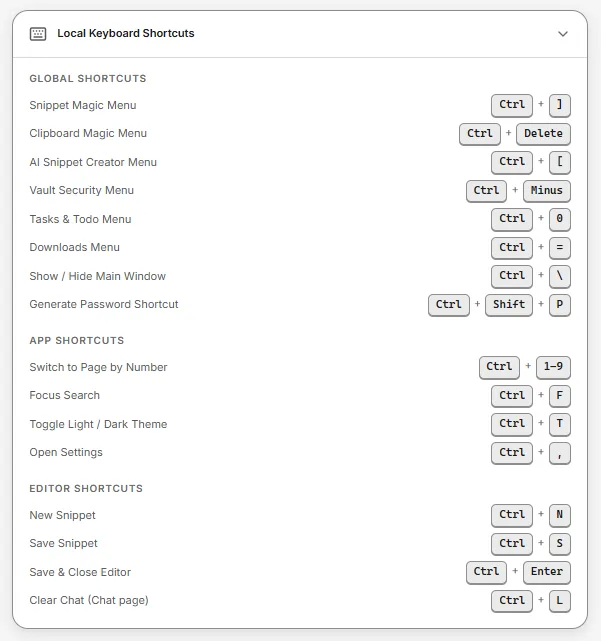
| Pintasan | Tindakan |
|---|---|
Ctrl+1 sampai Ctrl+9 | Arahkan langsung ke halaman bilah sisi berdasarkan posisi |
Ctrl+, | Buka Pengaturan |
Ctrl+T | Ganti tema Terang / Gelap |
Ctrl+N | Buat snippet baru |
Ctrl+F | Fokuskan kolom pencarian (pada halaman daftar/pencarian) |
Ctrl+S / Ctrl+Enter | Simpan snippet (di editor snippet) |
Ctrl+L | Bersihkan percakapan obrolan (pada halaman Chat) |
Memecahkan Konflik
Alt+Spacesering bertabrakan dengan Microsoft PowerToys (PowerToys Run) atau Flow Launcher.Win+Vdiklaim secara permanen oleh Clipboard Manager bawaan Windows. Snipset tidak dapat menimpanya; gunakanCtrl+]untuk Clipboard Magic Menu (danCtrl+Shift+Vuntuk Paste Queue).Ctrl+Alt+DeletedanCtrl+Shift+Escdikunci oleh OS.
Solusinya: Jika terjadi konflik, cukup kembali ke halaman Pengaturan dan pilih kombinasi modifier yang berbeda (mis. menambahkan Shift ke dalamnya).
Kontroler (gamepad)
Kontroler game USB bisa kamu pakai bersama keyboard. Tombolnya bisa membuka menu seperti Magic Menu, menyisipkan snippet, menjalankan pintasan suara (tahan tombol untuk dikte), dan mengirim tombol seperti Enter, Esc, Tab, dan panah ke aplikasi yang sedang kamu pakai. Keyboard kamu tetap berfungsi seperti biasa.
Cara menyalakan
- Buka Pengaturan → Ekspansi & Pintasan → Kontroler.
- Nyalakan Pakai kontroler. Fitur ini mati sampai kamu menyalakannya.
- Colokkan kontroler. Dalam beberapa detik, status menampilkan Terhubung dan nama kontrolernya.
Setelah menyala, D-pad mengirim tombol panah, stik kiri menggerakkan pointer, dan Start mengirim Enter. Untuk mengubahnya, buka Tombol sebagai keyboard: matikan D-pad sebagai tombol panah, pakai Hapus di baris seperti Start, atau pakai Tambah tombol supaya tombol lain mengirim tombol keyboard seperti Esc atau Tab.
Panah, Page Up, Page Down, Backspace, dan Delete berulang selama tombolnya kamu tahan. Enter tidak pernah berulang, begitu juga tombol dengan Ctrl, Alt, Shift, atau Super, jadi menahan Start tidak akan mengirim pesan dua kali.
Menggerakkan pointer
Secara bawaan, stik kiri menggerakkan pointer mouse dan stik kanan menggulir. Dorongan kecil menggerakkan pointer pelan, dan dorongan penuh menggerakkannya cepat; makin jauh stik kanan kamu dorong, makin cepat guliran. Fitur ini langsung menyala begitu Pakai kontroler menyala; untuk mematikannya, buka Tombol sebagai keyboard lalu matikan Stik sebagai pointer mouse.
Supaya pointer digerakkan stik kanan, atur Stik pointer menjadi Stik kanan. Setelah itu tidak ada stik yang menggulir, dan stik kiri bisa mengirim tombol panah: nyalakan Stik kiri sebagai tombol panah. Selama stik kiri menggerakkan pointer, pilihan itu tidak bisa diubah.
Secara bawaan, R1 adalah Klik kiri dan R2 adalah Klik kanan. Tahan tombolnya untuk menyeret, lalu lepaskan untuk meletakkan. Lewat Tambah tombol di Tombol sebagai keyboard, kamu bisa mengatur tombol apa pun menjadi Klik kiri, Klik kanan, atau Klik tengah.
Klik selalu jatuh di posisi pointer. D-pad mengirim tombol panah, jadi di daftar atau prompt terminal D-pad menggeser sorotan, bukan pointer. Supaya sebuah tombol bisa memilih item yang sedang disorot, atur tombol itu menjadi Enter atau Spasi di Tombol sebagai keyboard.
Di daftar tombol yang sama, kamu juga bisa mengatur tombol apa pun menjadi Gulir ke atas atau Gulir ke bawah. Sekali tekan menggulir satu langkah, dan selama tombolnya kamu tahan, guliran terus berjalan seperti saat menahan tombol panah.
Untuk menggerakkan pointer dengan tombol, atur tombol apa pun, misalnya arah D-pad, menjadi Pointer ke atas, Pointer ke bawah, Pointer ke kiri, atau Pointer ke kanan di Tombol sebagai keyboard. Selama tombolnya kamu tahan, pointer bergerak dengan kecepatan tetap.
Di Linux, pointer butuh akses yang sama dengan yang sudah dipakai Snipset untuk mengetik, yaitu perangkat /dev/uinput. Saat kamu menjeda kontroler, pointer juga berhenti.
Merekam tombol atau kombo
Di bagian Pintasan, klik kolom di sebelah tindakan (misalnya Buka Magic Menu), lalu tekan tombol kontroler. Untuk kombo, tahan satu tombol lalu tekan tombol lain, hingga 3 tombol, lalu lepaskan. Satu tombol atau kombo hanya punya satu fungsi, jadi kalau kamu merekam tombol yang sudah dipakai, tombol itu pindah ke tindakan yang baru. Tombol yang menjadi awal sebuah kombo akan menunggu: kalau kamu menekan sisa kombonya, hanya kombo yang jalan, dan kalau kamu melepasnya lebih dulu, pintasan tombol itu sendiri jalan sekali. Tombol panah, gulir, dan klik tidak menunggu, jadi tetap bisa berulang dan menyeret.
Di editor snippet, baris Pintasan Global menampilkan kolom Kontroler di bawah kolom Keyboard. Kolom itu bertuliskan Belum diatur sampai kamu merekamnya: klik kolomnya, lalu tekan tombol atau kombo di kontroler. Tombol hapusnya tetap bisa dipakai walau Pakai kontroler mati. Ini berlaku selama Pakai kontroler menyala, dan setelahnya tombol itu menyisipkan snippet tersebut.
Game dan emulator
Game dan emulator juga membaca kontroler, jadi satu tekanan sampai ke dua program sekaligus. Beberapa, seperti DuckStation, tetap membacanya walau sedang berjalan di latar belakang. Pasang Jeda kontroler ke satu kombo di Pintasan, lalu tekan kombo itu sebelum kamu main. Selama dijeda, Snipset mengabaikan semua tombol kecuali kombo itu; tekan lagi untuk melanjutkan. Kamu juga bisa mematikan Pakai kontroler selama main.
Akses di Linux
Snipset membaca kontroler lewat /dev/input. Di kebanyakan desktop, akun yang sedang login sudah punya akses. Kalau status bilang Snipset tidak bisa membaca kontroler, beri akun kamu izin membaca /dev/input, misalnya dengan masuk ke grup input (sudo usermod -aG input $USER, lalu logout dan login lagi). Setelah itu, matikan lalu nyalakan lagi Pakai kontroler.
Windows
Di Windows, Snipset membaca kontroler USB umum, seperti pad DragonRise, dan kontroler Xbox, juga saat program lain seperti game atau editor sedang di depan. Snippet, pintasan, tombol sebagai keyboard, pointer, klik, gulir, dan jeda bekerja sama seperti di Linux, dan tidak perlu mengatur izin tambahan. Kontroler Xbox muncul satu kali, dengan nama tombol sesuai posisinya, jadi tombol A terbaca sebagai Silang (X). Windows tidak mengizinkan program biasa mengirim tombol, klik, atau gulir ke program yang berjalan sebagai administrator, jadi tombol kontroler dan pointer tidak berpengaruh di jendela seperti itu. Snipset tidak meminta hak administrator.
Platform dan nama tombol
- Input kontroler bisa dipakai di Linux dan Windows.
- Nama tombol mengikuti posisinya, dengan label PlayStation: Silang (X) di bawah, Lingkaran di kanan, Kotak di kiri, dan Segitiga di atas. Pad dengan label lain tetap bekerja sesuai posisi, jadi tombol A di pad Xbox terbaca sebagai Silang (X).
- Di Windows, LT dan RT di pad Xbox bekerja sebagai tombol L2 dan R2, dan terhitung ditekan setelah lewat setengah jalan. Di Linux, keduanya tidak dipakai.
- Pad yang tidak dikenali Snipset menampilkan tombol bernomor (Tombol 1, Tombol 2, dan seterusnya). Di beberapa pad murah, nama tombol bisa tidak cocok dengan label yang tercetak, tapi pintasannya tetap jalan karena Snipset merekam apa yang dikirim pad.