Configuration
Keyboard Shortcuts
Customize global keyboard shortcuts to suit your workflow.
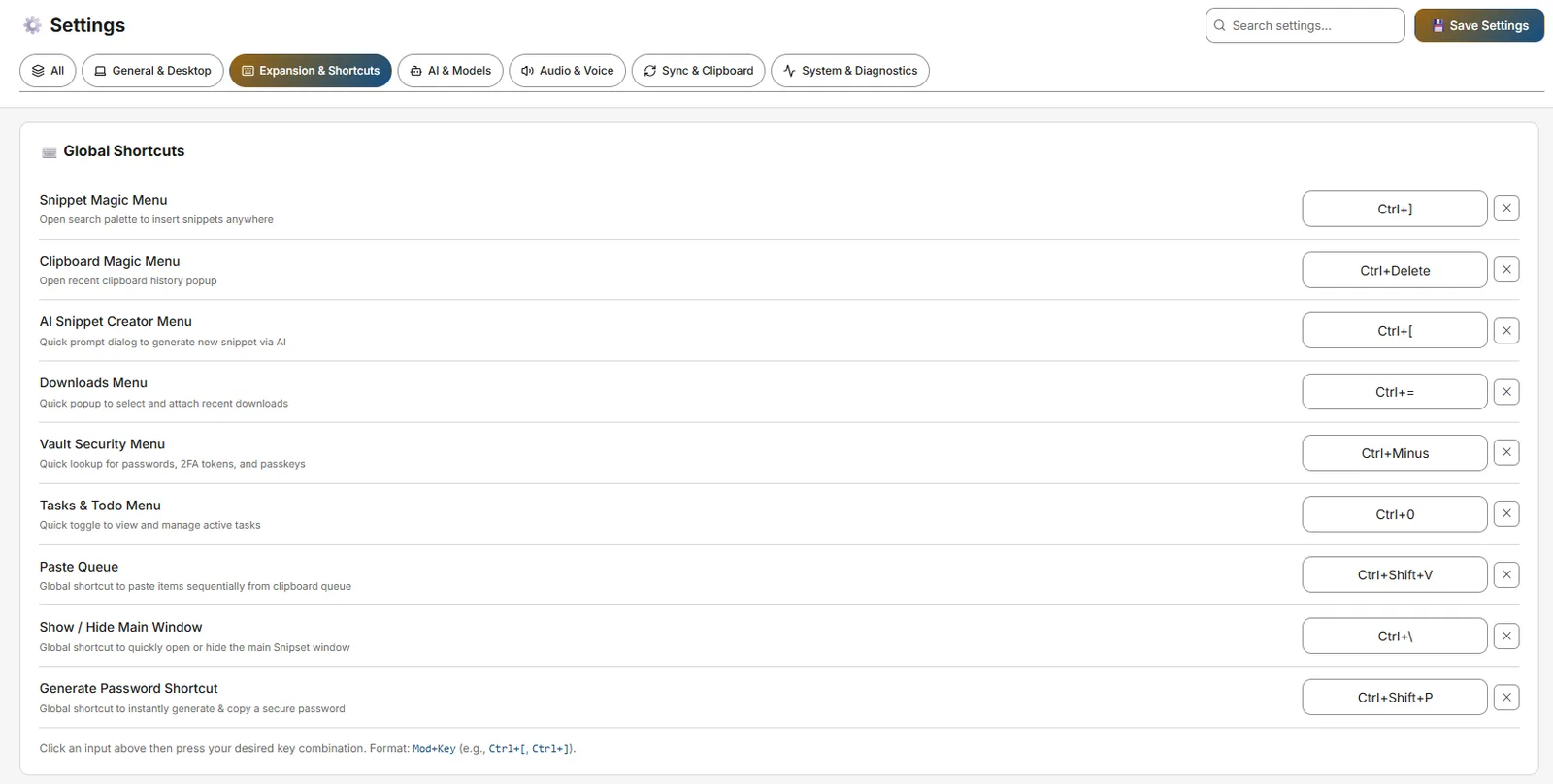
Snipset relies heavily on global keyboard shortcuts (hotkeys that work regardless of which application is currently active on your screen). If the default shortcuts conflict with other software you use, you can easily change them in the Settings menu.
Modifying a Shortcut
- Open Shortcuts Settings Navigate to Settings → Expansion & Shortcuts → Global Shortcuts in the main Snipset window (also Settings → Audio & Voice for dictation/translation/ask-anything/read-aloud).
- Select the Input Field Click inside the input box for the action you want to change (e.g., Magic Menu).
- Press the New Combination Press the actual keys on your keyboard that you want to use (e.g., press
Ctrl+Shift+Mat the same time). Snipset will record the combination and save it instantly.
Default Shortcut Reference
| Action | Default Shortcut | Description |
|---|---|---|
| Open Snippet Magic Menu | `Ctrl+[` | Opens the spotlight-style search overlay to instantly search and insert any snippet. |
| Open Clipboard Magic Menu | `Ctrl+]` | Opens the clipboard overlay to paste recently copied text or images. |
| Open AI Creator Menu | `Ctrl+Shift+Space` | Opens the AI snippet creation prompt overlay anywhere on screen. |
| Open MFA Menu | `Ctrl+Shift+M` | Opens the 2FA / TOTP authentication overlay. |
| Open Tasks Menu | `Alt+D` | Opens the quick tasks and to-do overlay. |
| Open Downloads Menu | `Ctrl+Shift+D` | Opens the recent downloads management overlay. |
| Smart Shorthand (Selection) | `Ctrl+Shift+S` | Expand selected shorthand via on-device Qwen model. |
| Paste Queue | `Ctrl+Shift+V` | Queue multiple clipboard entries for sequential pasting. |
| Generate Password | `Ctrl+Alt+P` | Generate and copy a password from Vault (autofill `Ctrl+Shift+U`). |
| Voice Dictation / Translation / Ask-Anything / Read Aloud | `Alt+.` / `Alt+A` / `Alt+S` / `Alt+I` (aliases `CommandOrControl+Alt+D/T/A/R`) | Speech shortcuts under Settings → Audio & Voice. |
In-App Local Shortcuts
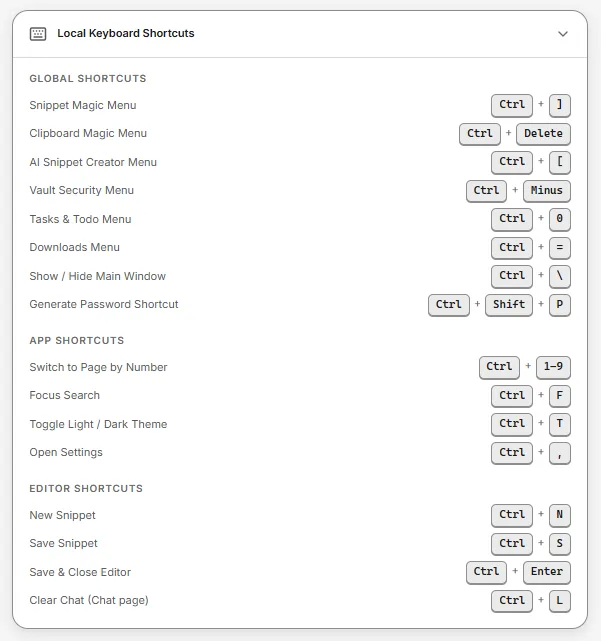
| Shortcut | Action |
|---|---|
Ctrl+1 to Ctrl+9 | Navigate directly to sidebar pages by position |
Ctrl+, | Open Settings |
Ctrl+T | Toggle Light / Dark theme |
Ctrl+N | Create a new snippet |
Ctrl+F | Focus search input (on list/search pages) |
Ctrl+S / Ctrl+Enter | Save snippet (in snippet editor) |
Ctrl+L | Clear chat conversation (on Chat page) |
Troubleshooting Conflicts
Alt+Spaceoften conflicts with Microsoft PowerToys (PowerToys Run) or Flow Launcher.Win+Vis permanently claimed by the default Windows Clipboard Manager. Snipset cannot override this; useCtrl+]for Clipboard Magic Menu (andCtrl+Shift+Vfor Paste Queue).Ctrl+Alt+DeleteandCtrl+Shift+Escare locked by the OS.
The Solution: If a conflict occurs, simply return to the Settings page and choose a different modifier combination (e.g., adding Shift to the mix).
Controller (gamepad)
A USB game controller can work next to your keyboard. Its buttons can open menus such as Magic Menu, insert a snippet, run the voice shortcuts (hold a button to dictate), and send keys such as Enter, Esc, Tab, and the arrows to the app in front. Your keyboard keeps working as usual.
Turn it on
- Open Settings → Expansion & Shortcuts → Controller.
- Turn on Use a controller. It is off by default.
- Plug in the controller. Within a few seconds the status shows Connected and its name.
Once it is on, the D-pad sends the arrow keys, the left stick moves the pointer, and Start sends Enter. To change this, go to Buttons as keys: turn off D-pad as arrow keys, use Remove on a row such as Start, or use Add a button to make another button send a key such as Esc or Tab.
Arrows, Page Up, Page Down, Backspace, and Delete repeat while you hold the button. Enter never repeats, and neither does a key with Ctrl, Alt, Shift, or Super, so holding Start cannot send a message twice.
Move the pointer
By default, the left stick moves the mouse pointer and the right stick scrolls. A small push moves the pointer slowly, and a full push moves it fast; the right stick scrolls faster the further you push it. This is on as soon as Use a controller is on; to turn it off, go to Buttons as keys and turn off Stick as mouse pointer.
To point with the right stick instead, set Pointer stick to Right stick. Then no stick scrolls, and the left stick can send the arrow keys: turn on Left stick as arrow keys. That toggle stays greyed out while the left stick moves the pointer.
By default, R1 is Left click and R2 is Right click. Hold the button to drag, then let go to drop. With Add a button under Buttons as keys, you can set any button to Left click, Right click, or Middle click.
A click lands where the pointer is. The D-pad sends arrow keys, so in a list or a terminal prompt it moves the highlight, not the pointer. To choose the highlighted item with a button, set that button to Enter or Space under Buttons as keys.
You can also set any button to Scroll up or Scroll down in the same key list. One press scrolls one step, and holding the button keeps scrolling, like holding an arrow key.
To move the pointer with buttons, set any button, for example a D-pad direction, to Pointer up, Pointer down, Pointer left, or Pointer right in Buttons as keys. The pointer moves at a steady speed while you hold the button.
On Linux, the pointer needs the same access Snipset already uses to type: the /dev/uinput device. When you pause the controller, the pointer stops too.
Record a button or combo
Under Shortcuts, click the field next to an action (for example Open Magic Menu) and press a controller button. For a combo, hold one button and press another, up to 3 buttons, then let go. Each button or combo does one thing, so recording one that is already in use moves it to the new action. A button that starts a combo waits: if you press the rest of the combo, only the combo runs, and if you let go first, the button's own binding runs once. Arrow keys, scrolling, and clicks don't wait, so they still repeat and drag.
In the snippet editor, the Global Hotkey row shows a Controller field under the Keyboard field. It shows Not set until you record one: click it, then press the button or combo on the controller. Its clear button works even while Use a controller is off. This works while Use a controller is on, and pressing that button later inserts the snippet.
Games and emulators
Games and emulators read the controller too, so one press reaches both programs. Some, such as DuckStation, keep reading it even in the background. Bind Pause controller to a combo under Shortcuts and press it before you play. While paused, Snipset ignores every button except that combo; press it again to resume. You can also turn Use a controller off while you play.
Linux access
Snipset reads controllers through /dev/input. On most desktops the logged-in user already has access. If the status says Snipset cannot read the controller, allow your user to read /dev/input, for example by joining the input group (sudo usermod -aG input $USER, then log out and back in). Then turn Use a controller off and on.
Windows
Snipset reads generic USB controllers, such as DragonRise pads, and Xbox controllers on Windows, also while another program such as a game or an editor is in front. Snippets, shortcuts, buttons as keys, the pointer, clicks, scrolling, and pause work the same as on Linux, and no extra permission setup is needed. An Xbox controller shows up once, with buttons named by position, so A shows as Cross. Windows does not let a normal program send keys, clicks, or scrolling into a program that runs as administrator, so controller keys and the pointer do nothing in such a window. Snipset does not ask for administrator rights.
Platforms and button names
- Controller input works on Linux and Windows.
- Buttons are named by position with PlayStation labels: Cross (bottom), Circle (right), Square (left), and Triangle (top). Pads with other labels work the same by position, so A on an Xbox pad shows as Cross.
- On Windows, LT and RT on an Xbox pad work as the L2 and R2 buttons and count as pressed past half way. On Linux they are not used.
- A pad Snipset does not recognize shows numbered buttons (Button 1, Button 2, and so on). On some low-cost pads the names may not match the printed labels, but bindings still work because Snipset records what the pad sends.