AI Integration
Smart Shorthand
Expand shorthand selections with a local Qwen model, offline and on-device.
Smart Shorthand expands an abbreviated selection (e.g. Indonesian shorthand) into polished text using a dedicated local model. It works entirely offline with no cloud calls.
Model
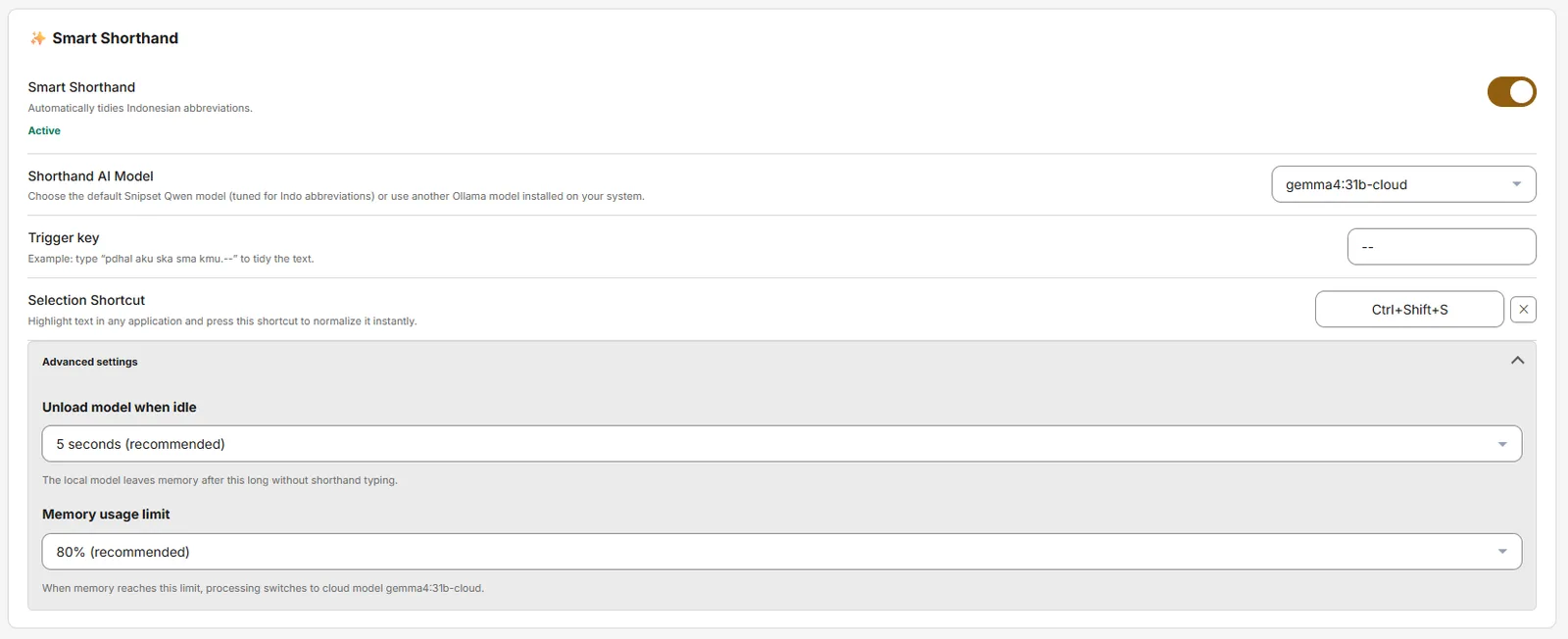
- Default model:
hf.co/belajarcarabelajar/snipset-qwen-1.5b-gguf(~941 MB) - Settings: Settings → AI & Models → Smart Shorthand: Trigger key
--(also%%), Selection ShortcutCtrl+Shift+S(DEFAULT_SMART_SHORTHAND_SHORTCUT), Unload when idle (5s / Immediately / 30s / 1m / 5m / 30m), Memory usage limit 80%/70%/90%/Disabled. - Download via the Model Catalog one-click hub; progress is shown in the Smart Shorthand section.
How to Use
- Select shorthand text in any app (e.g.
sy mau ct email klien --). - Press
Ctrl+Shift+S(or type the trigger--depending on mode). - Snipset runs
normalize_selected_shorthand_cmdlocally and replaces the selection with the expanded form.
Commands
normalize_selected_shorthand_cmd: invoked via selection shortcut or trigger key. Respectssmart_shorthand_model,smart_shorthand_idle_timeout,smart_shorthand_ram_thresholdpreferences.
Memory: The Qwen model is large. If you are low on RAM, set **Memory usage limit** to 70% or **Unload when idle: Immediately** to free memory quickly after use.