Support Center
Support Center
How to submit a support ticket, report bugs, and request features from the Snipset team.
The Support Center allows you to contact the Snipset team directly from inside the application. You can report bugs, submit feature requests, ask questions, or resolve billing and license inquiries.
Accessing the Support Center
You can open the Support Center at any time:
- Open the Snipset main application window.
- Select Support in the navigation sidebar. The page opens as Support Center.
- The Submit a Support Ticket form will display.
Submitting a Support Ticket
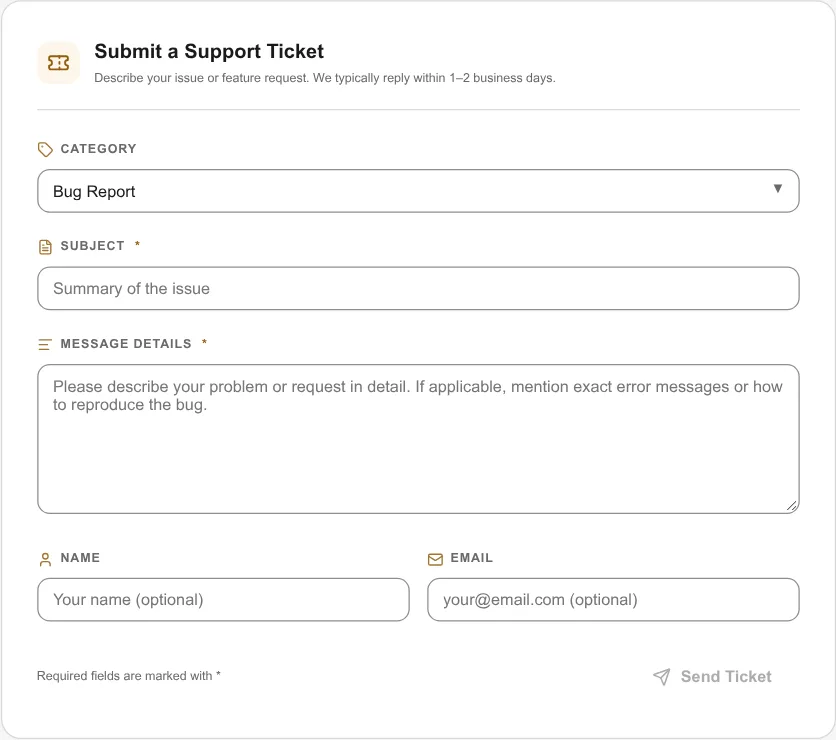
The ticket form contains the following fields:
| Field | Required | Description |
|---|---|---|
| Category | Preselected | Select the topic that best matches your request (see categories below). Bug Report is selected by default. |
| Subject | Yes | A concise summary of the issue or request. |
| Message Details | Yes | A complete description of what happened, steps to reproduce, or details of your request. |
| Name | Optional | Your preferred display name so our team knows how to address you. |
| Optional | Your email address if you would like reply notifications delivered to your inbox. |
Ticket Categories
Choose the category that matches your inquiry:
- Bug Report: Use this when something does not work as expected, crashes, or produces unexpected errors.
- Feature Request: Use this to propose new capabilities, workflows, or UI improvements.
- General Question: Use this for general how-to questions, configuration guidance, or usage inquiries.
- Billing & License: Use this for questions regarding license keys, activation limits, or subscription renewals.
Submitting Your Ticket
- Fill in the Subject and Message Details fields. Both are required before submission.
- Provide your Name and Email if you want direct follow-up.
- Click the Send Ticket button.
Snipset submits the ticket to our support system. Our team typically reviews and replies within 1 to 2 business days.
After Submission
Once submitted, the Support Center displays a confirmation card:
- Ticket Reference ID: A unique reference identifier (such as
#A3F2B1C0) is assigned to your request. Keep this ID handy for any follow-up communications. - WhatsApp Direct Follow-up: If you prefer instant messaging, click the Chat on WhatsApp button. Snipset will open WhatsApp with your ticket ID, category, and subject pre-filled.
- Submit Another Ticket: Click Submit another ticket if you need to file an additional ticket.
Tips for Effective Bug Reports
To help our engineering team diagnose and fix bugs quickly, include:
- Step-by-Step Reproduction: Numbered steps describing what you clicked or typed before the issue occurred.
- Expected vs. Actual Behavior: What you expected to happen versus what actually took place.
- App and System Version: Your Snipset version (found in Settings → System & Diagnostics → About) and operating system version.
- Exact Error Messages: Copy and paste the full error text, or describe any warning dialogs displayed.