Productivity Tools
Pomodoro Timer
Master deep work and structured focus sessions with Snipset's built-in Pomodoro timer, ambient music, floating overlay, and analytics.
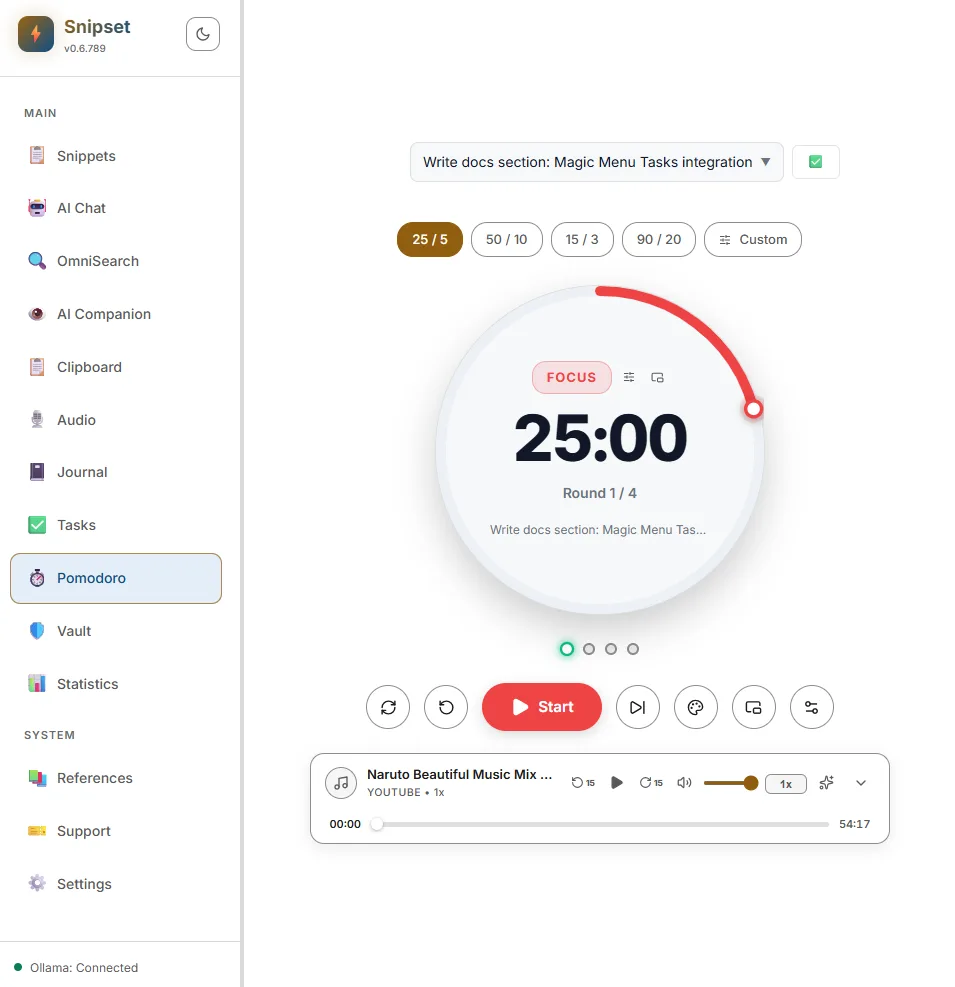
The Pomodoro Timer in Snipset is a dedicated deep-work engine designed to help you maintain sustained concentration, prevent cognitive burnout, and streamline your workflow directly from your desktop. Built with a local-first architecture and zero external runtime dependencies, it integrates tightly with Snipset's Task Manager, statistics dashboard, and desktop hotkeys.
Key Capabilities
- Customizable Intervals & Presets: Choose between classic intervals (25m Focus / 5m Break / 15m Long Break), short sprints, long endurance sessions, ultradian rhythms, or fully custom session lengths.
- Always-on-Top Floating Mini Overlay: Detach the timer into a lightweight, draggable floating HUD that stays visible over code editors, IDEs, and research tools without taking up screen real estate.
- Synthetic Web Audio Synthesis: Zero-latency, crystal-clear audio notifications synthesized directly via the Web Audio API without relying on external media files.
- Integrated Background & Ambient Music: Built-in player featuring curated lofi and focus streams, ambient soundscapes, YouTube audio integration, and custom stream URL support.
- 24 Retro & Modern Themes: Seamlessly match your desktop environment with palettes such as Pomotroid Classic, Dracula, Nord, Gruvbox, Tokyo Night, Synthwave '84, Catppuccin, and Snipset Modern.
- Task Association: Link your active focus session to specific tasks in Snipset's Task Manager, automatically tracking Pomodoro count per item.
- Deep Work & Circadian Analytics: Monitor focus streaks, daily goals, and energy distribution across Morning, Afternoon, Evening, and Night intervals in the Statistics tab.
Getting Started
To launch the Pomodoro timer:
- Open the main Snipset window.
- Navigate to Pomodoro in the sidebar (or press your configured global shortcut).
- Select an interval preset or click the Dial to start your focus session immediately.
+-------------------------------------------------------------+
|  [ Preset: 25 / 5 / 15 ]      [ Task: Refactor auth module ]|
|                                                             |
|                       ( 24 : 58 )                           |
|                       ● ● ○ ○ (Round 1/4)                   |
|                                                             |
|           [ ▶ Start ]    [ ⏭ Skip ]    [ ⚙ Settings ]       |
+-------------------------------------------------------------+
| 🎵 Lofi Focus Stream (Playing)          🔊 [======--] 80%   |
+-------------------------------------------------------------+
Timer Phases & Presets
The timer cycles through three distinct operational phases:
- Work (Focus): High-concentration interval dedicated exclusively to your active task.
- Short Break: 3 to 5-minute breathing period to relax your eyes and stretch.
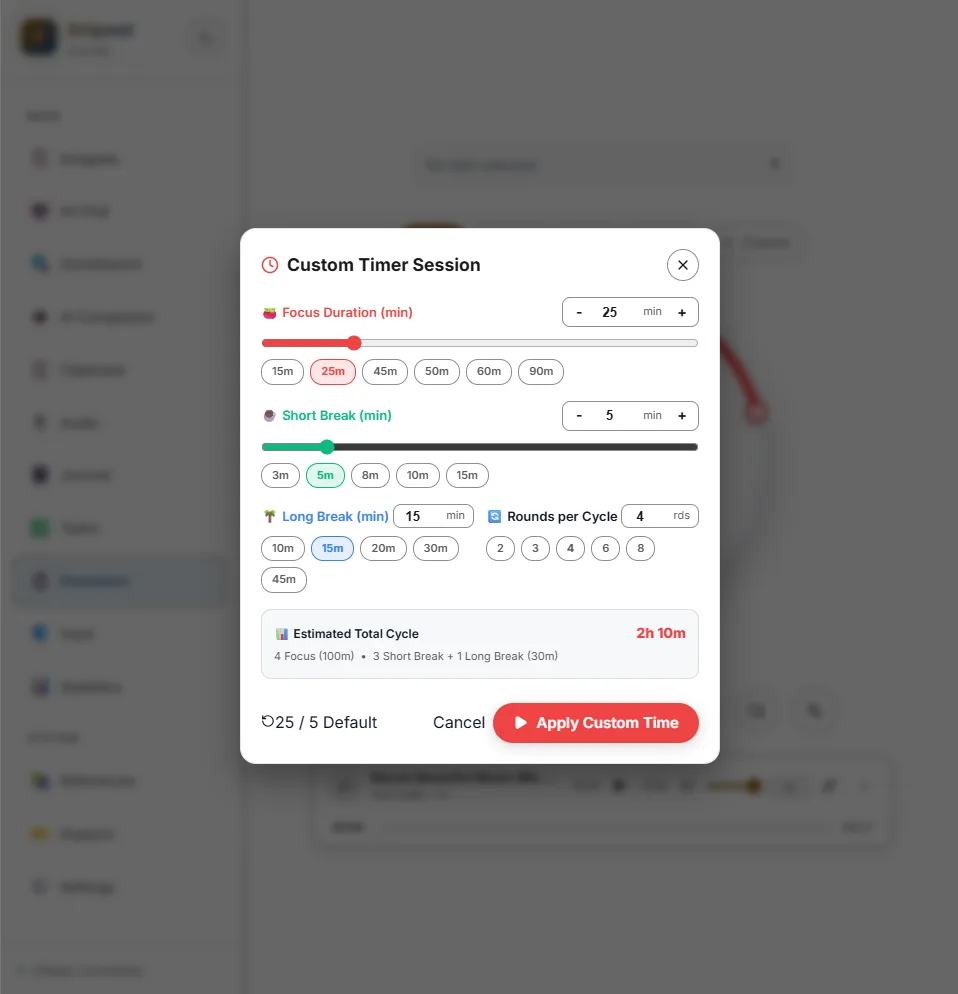
- Long Break: Extended 15 to 30-minute recuperation interval triggered after completing a full cycle (default: 4 rounds).
Interval Presets
Snipset provides four tuned presets out of the box, as well as a custom interval editor:
| Preset Name | Focus Phase | Short Break | Long Break | Long Break Interval | Recommended Use Case |
|---|---|---|---|---|---|
| Classic Pomodoro | 25 min | 5 min | 15 min | Every 4 rounds | General software development and writing |
| Short Sprint | 15 min | 3 min | 10 min | Every 4 rounds | Quick bug fixes, email triage, and high-urgency bursts |
| Long Endurance | 50 min | 10 min | 30 min | Every 4 rounds | Complex architectural design, research, and deep debugging |
| Ultradian Rhythm | 90 min | 20 min | 30 min | Every 2 rounds | Natural human 90-minute biological focus cycles |
| Custom Time | 1–180 min | 1–60 min | 1–90 min | User-defined | Personalized workflows and study regimes |
Always-On-Top Floating Overlay
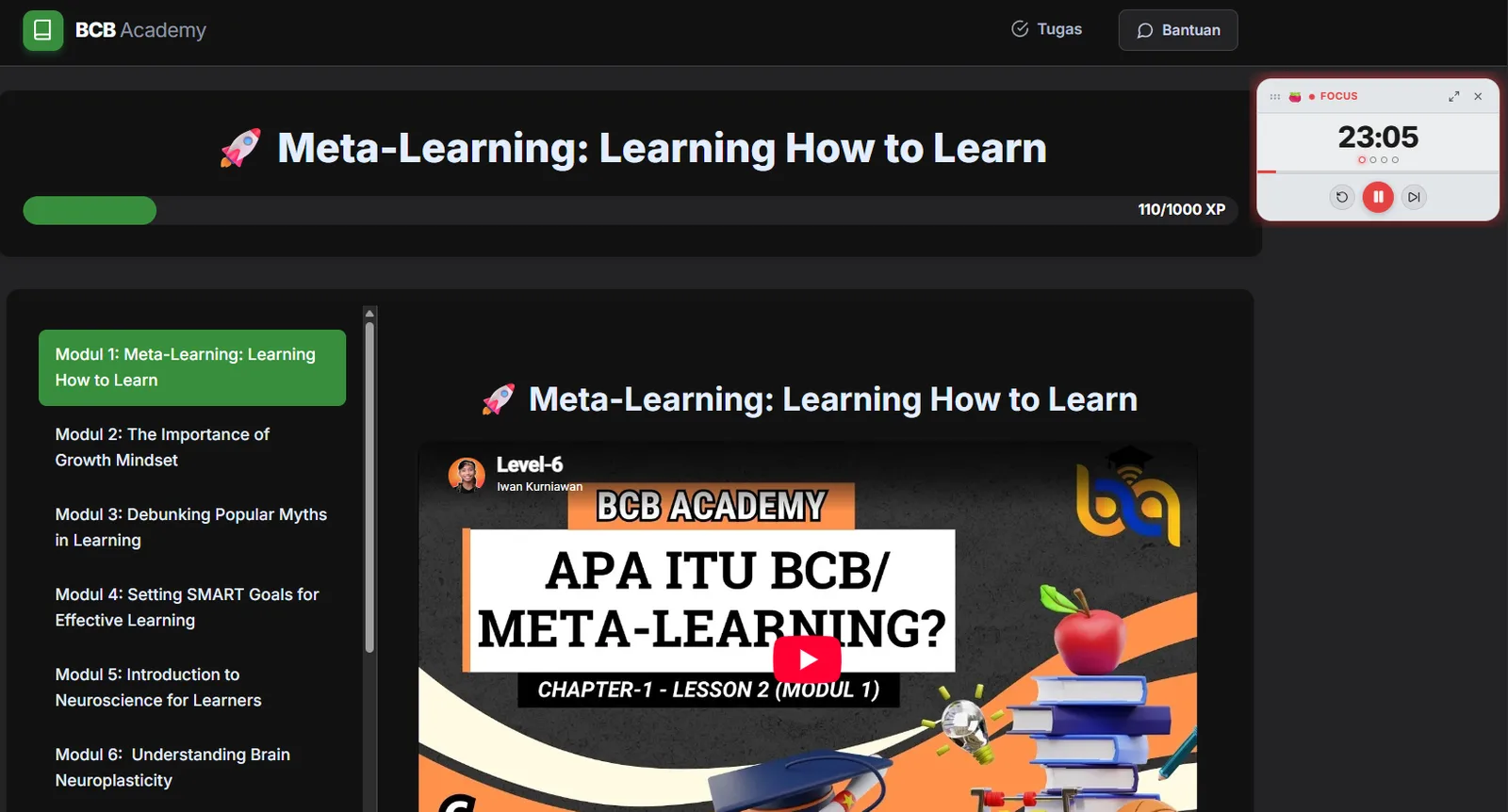
When working across multiple monitors or full-screen IDEs, keeping the main Snipset window open can be distracting. You can detach the timer into a floating mini HUD.
- Docking & Positioning: Snap the overlay to any screen corner (Top-Right, Top-Left, Bottom-Right, Bottom-Left) or drag it freely across displays.
- Compact HUD: Displays phase state, a circular progress ring, round counter pips, and instant Play/Pause/Skip controls.
- Window Pinning: Uses native Tauri window pinning (
alwaysOnTop: true) with customizable opacity to prevent obscuring underlying content.
Double-click the floating overlay window title or click the Expand icon to return instantly to the full Pomodoro dashboard.
Audio Synthesis & Background Music
Snipset pairs synthesized chimes with an integrated music player so you can focus without juggling external audio apps. No external audio files are required (chimes are generated locally).
Synthetic Sound Generator (Web Audio API)
Snipset utilizes client-side Web Audio synthesis rather than static MP3/WAV assets. This ensures zero disk latency, zero asset corruption, and low memory consumption:
- Work Completed Chime: Gentle, high-harmonic chime signaling the end of a focus block.
- Break Completed Chime: Uplifting two-tone chime reminding you to resume work.
- Subtle Ticking: Optional rhythmic ticking pulse to enforce pacing during crunch sessions.
- Volume & Idle Sleep: Integrated volume slider with automatic audio context suspension during idle periods to free OS audio hardware handles.
Ambient & Lofi Music Player
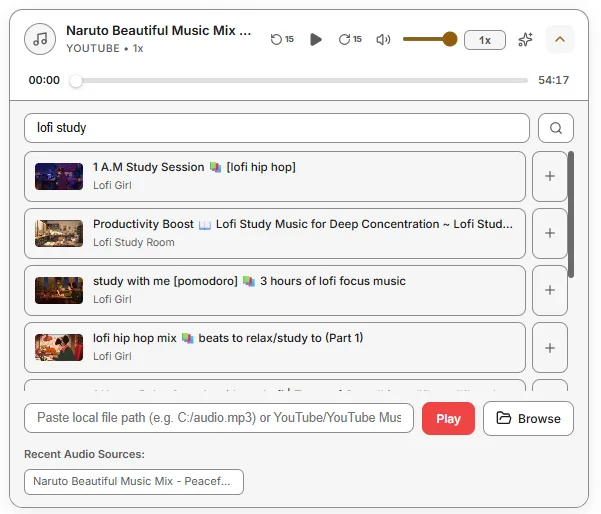
Located directly below the timer controls, the integrated music player supports:
- Curated Focus Streams: Built-in ambient noise (rain, cafe, white noise) and 24/7 lofi hip hop.
- YouTube Audio Stream Support: Paste any YouTube video or livestream URL to stream audio in the background without video decoding overhead.
- Independent Volume Control: Adjust music levels separately from completion alert chimes.
Theme Customization
Personalize your workspace aesthetic with 24 built-in theme presets featuring custom accent colors for each phase:
- Classic & Terminal: Pomotroid Classic, Minimal Monochrome, Snipset Modern.
- Popular Code Palettes: Dracula, Nord, Gruvbox Dark / Light, Tokyo Night, Monokai Pro, One Dark Pro, GitHub Dark / Light.
- Vibrant & Neon: Catppuccin Mocha / Latte, Synthwave '84, Cyberpunk Neon, Rosé Pine, Forest Deep.
Each theme dynamically styles the progress dial ring, button states, glowing active borders, and the floating overlay HUD.
Task Management Integration
The Pomodoro Timer connects seamlessly with Snipset's built-in Task Manager:
- Active Task Picker: Select an existing task from your Inbox or project lists via the task dropdown at the top of the timer.
- Session Recording: Each finished focus block automatically increments the task's completed Pomodoro count (e.g.
🍅 3/5). - Completion Sync: Mark the associated task complete directly from the Pomodoro screen when work concludes.
Productivity Analytics & Circadian Insights
All completed focus sessions are logged locally to Snipset's analytics engine. Access comprehensive metrics from System → Statistics → Pomodoro:
- Core Metrics: Total hours focused, completed sessions, current daily streak, and target goal progress.
- Circadian Rhythm Energy Distribution: Categorizes your productive hours across four daily biological windows:
- 🌅 Morning (06:00 – 12:00): Deep creative & complex problem solving.
- ☀️ Afternoon (12:00 – 18:00): Execution, meetings, and code reviews.
- 🌆 Evening (18:00 – 22:00): Learning, research, and planning.
- 🌙 Night (22:00 – 06:00): Late-night uninterrupted focus.
- Historical Trends: Visual bar charts breakdown daily, weekly, and monthly focus velocity.
Configuration & Settings Reference
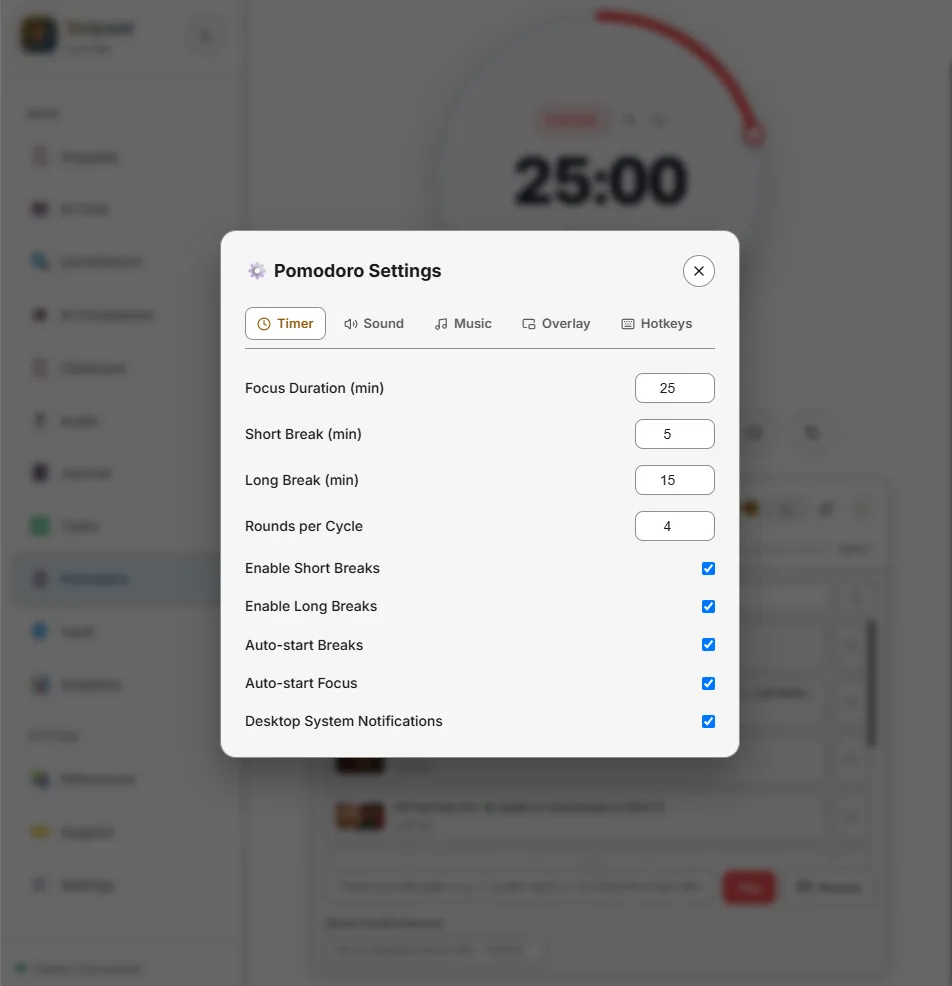
Configure the Pomodoro engine under Pomodoro Settings:
| Setting | Type | Default | Description |
|---|---|---|---|
autoStartBreaks | Boolean | false | Automatically begin break countdown when a focus block completes. |
autoStartWork | Boolean | false | Automatically begin the next focus block when a break ends. |
soundEnabled | Boolean | true | Enable or disable synthesized audio chimes. |
soundVolume | Number | 0.8 | Master volume for completion chimes (0.0 to 1.0). |
tickSound | Boolean | false | Enable subtle ticking audio during active countdowns. |
overlayOpacity | Number | 0.95 | Opacity percentage for the floating overlay window. |
defaultPreset | String | "classic" | Active interval preset loaded on application launch. |