Productivity Tools
Audio & Speech (TTS / STT)
Boost your productivity with Snipset's voice dictation (STT), continuous dictation, Read Aloud (TTS), post-hoc keystroke learning, and a personalized speech dictionary.
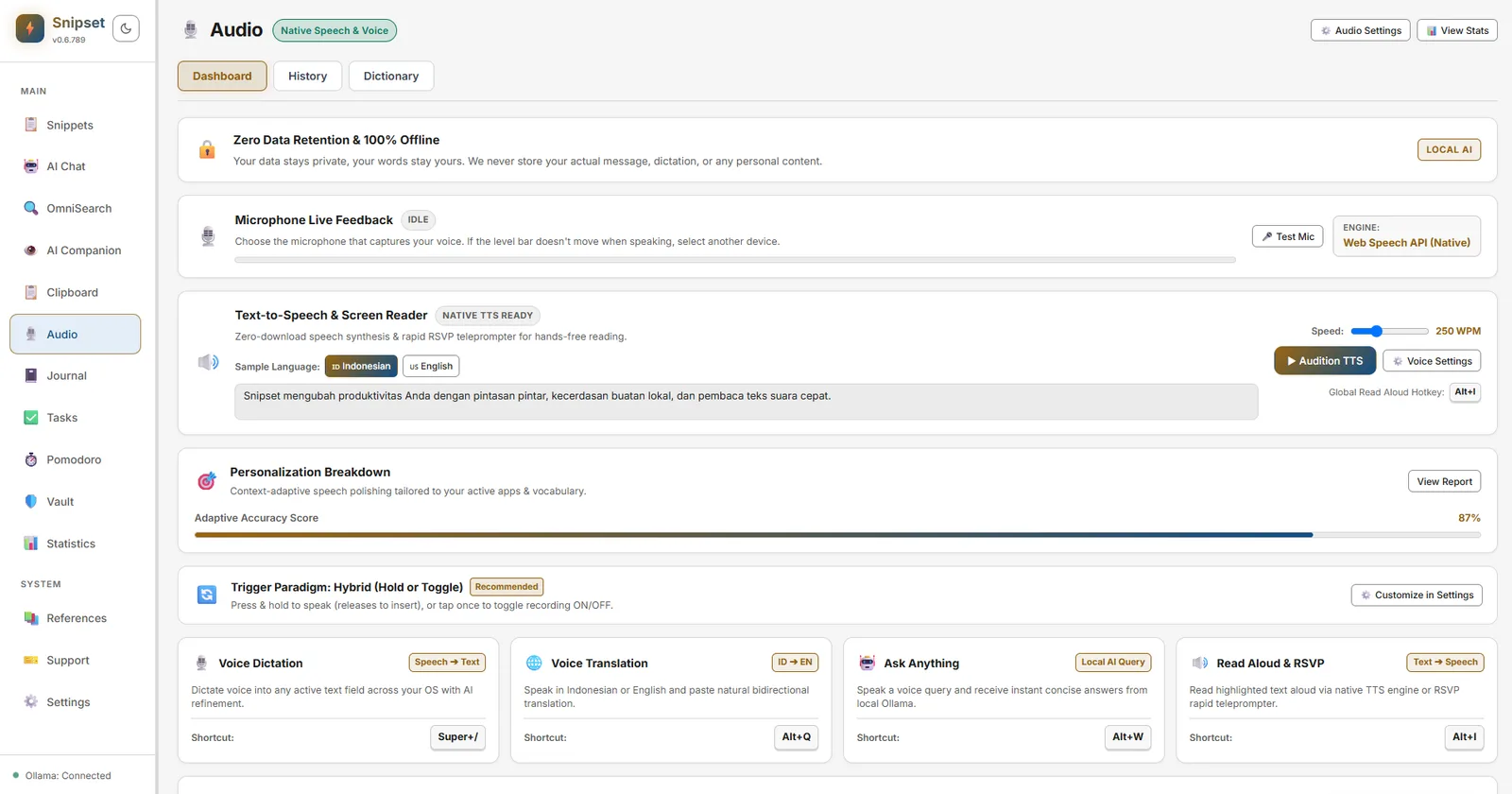
The Audio & Speech suite in Snipset integrates local Speech-to-Text (STT) voice dictation (powered by whisper-rs running the ggml-base-id-q8_0.bin model) and Text-to-Speech (TTS) Read Aloud (powered by your active WebView's Web Speech API) directly into your desktop workflow. STT runs entirely on-device with zero telemetry, while TTS uses the speech synthesis voices installed in your WebView (Edge, Chrome, or WebView2). The suite supports continuous dictation, a hard 30-minute recording safety cutoff, and an automatic silence-detection setting that is intentionally disabled to keep your transcript across thinking pauses.
Key Capabilities
- Multi-Mode Speech-to-Text (STT): Dictate text directly at your cursor, translate between English and Indonesian on the fly, or speak natural prompts directly to AI models (Ask Anything). Defaults:
CommandOrControl+Alt+Dfor dictate (the settings UI showsAlt+.as a placeholder),CommandOrControl+Alt+Tfor translate, andCommandOrControl+Alt+Afor ask-anything. - Continuous Dictation & Pause-Resilience: Speak at your natural pace with zero transcription loss during thinking pauses, silence gaps, or window focus shifts.
- Post-Hoc Keystroke Correction & Automated Learning: Tracks manual keyboard edits after dictation to calculate real-time edit rates and automatically suggest learned vocabulary for your custom dictionary.
- Global Read Aloud (TTS): Copy any text in any app and press your configured hotkey (
CommandOrControl+Alt+Rby default; the settings UI showsAlt+Ias a placeholder) to hear your clipboard text in the system voice or with ElevenLabs. - TTS Feedback for AI Responses: Listen to generated AI answers directly inside the floating speech overlay with full playback controls.
- Hardware Audio Optimization: Automatic Gain Control (AGC), Noise Suppression, Acoustic Echo Cancellation (AEC), and silence threshold tuning.
- Local Whisper & Offline Mode: Transcribe audio entirely on-device using the
whisper-rsengine running the bundledggml-base-id-q8_0.binmodel (about 82 MB) with zero data telemetry. The model is Whisper base fine-tuned for Indonesian by maleo-ai (Apache-2.0). Its raw transcripts are lowercase and unpunctuated, except for spoken punctuation words that Snipset turns into symbols; for automatic punctuation and capitalization, use Smart dictation (Layer 2) or the Gemini Cloud provider. The engine displays asWhisper Base Indonesian (Offline)in the speech dashboard. - Optional Gemini Cloud STT: Point the Speech-to-Text Provider at Gemini Cloud (opt-in) and dictation audio is sent to Google for Smart transcription, with local Layer 2 polishing skipped by default for speed. The speech dashboard, the privacy banner, and the recording overlay all report which engine produced the text.
- Personalized Speech Dictionary: Define custom acronyms, code symbols, and technical jargon to eliminate transcription errors.
- Voice Profiles & WebView Voices: Pick from the voices installed in your active WebView (Edge, Chrome, or WebView2). The set of available voices depends on your operating system and WebView; there is no SAPI5, Sherpa-ONNX, or custom cloned voice engine today.
- Privacy & Retention Guardrails: Configurable auto-purge periods for audio recordings and single-click history deletion.
- Productivity & Speech Analytics: Track words dictated, characters read aloud, edit distance rates, and time saved in the Statistics dashboard.
Getting Started
Access the Audio & Speech settings from Settings → Audio & Voice in the Snipset sidebar:
+-------------------------------------------------------------+
| 🎙️ Active Microphone: [ HyperX QuadCast S (Default)       ] |
| ⚡ Audio Preset:     [ ● USB / Headset  ○ Built-in / Far  ] |
| 🔊 Hardware Filters:  [✔] AGC   [✔] Noise Suppression [✔] AEC|
+-------------------------------------------------------------+
| 📝 Dictate Hotkey:     [ CommandOrControl+Alt+D    (UI: Alt+.)  ] |
| 🌐 Translate Hotkey:   [ CommandOrControl+Alt+T              ] |
| 🤖 Ask Anything:       [ CommandOrControl+Alt+A              ] |
| 🗣️ Read Aloud Hotkey:  [ CommandOrControl+Alt+R    (UI: Alt+I)  ] |
| 🌐 Inference Language: [ auto  (auto | id | en)               ▼ ] |
+-------------------------------------------------------------+
| 🤖 STT Model:          [ whisper-tiny-gguf (ggml-base-id-q8_0) ▼ ] |
| 🔊 TTS Engine:         [ System voice                        ▼ ] |
+-------------------------------------------------------------+
The hotkey text inputs display short hints like Alt+. or Alt+I for visual clarity, but the persisted default follows the CommandOrControl+Alt+X pattern shown in parentheses. Save the new shortcut from the settings UI to override the default.
Speech-to-Text (STT) & Dictation Modes
Snipset routes dictation through the local Whisper engine (Whisper (Offline)) by default, with the browser Web Speech API kept only as a fallback for non-Tauri preview builds. If you opt into the Gemini Cloud provider and store an API key, dictation is transcribed by Google instead and the offline engine steps aside. The desktop app supports three distinct voice input modes mapped to your preferred triggers:
1. Direct Dictation (dictate)
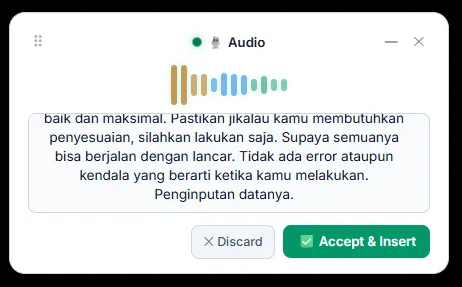
Hold (Push-to-Talk) or press (Toggle) your dictation shortcut, speak naturally, and release. Snipset transcribes your voice in real time and automatically types the text at your active cursor position.
- Continuous Text Retention: Speaking pauses and thinking breaks do not cause premature timeouts. Your live transcript accumulates safely across multiple speech segments.
- Punctuation & Capitalization: Turns spoken punctuation words ("comma", "period", "new line") into symbols in every mode; Smart mode also adds punctuation and capitalization automatically.
- Cursor Injection: Uses low-level Windows input synthesis to paste directly into IDEs, command prompts, chat apps, and browser forms. Click Accept & Insert to inject or Discard to cancel.
2. Live Voice Translation (translate)
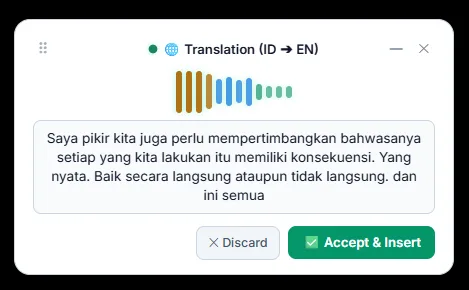
Speak in your native language, and Snipset automatically transcribes and outputs the translated text into your chosen target language in real time.
Snipset currently supports bidirectional translation between English and Indonesian only. Other language pairs are not yet available.
- Bilingual EN ↔ ID Workflow: Ideal for drafting cross-border emails, translating meeting notes between teammates, or capturing bilingual voice notes.
- Translation Preview: Review the final translated text in the floating overlay before accepting insertion.
3. Voice AI: Ask Anything (ask_anything)
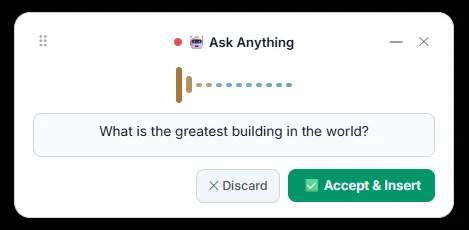
Speak complex questions or coding instructions. Snipset captures your voice, converts it to structured text, forwards it to your active local Ollama model or Cloud AI assistant, and displays the response in the overlay card with immediate text insertion and Read Aloud audio playback options.
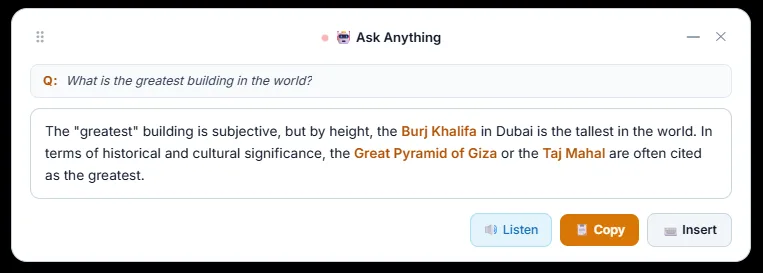
- Speech-to-Prompt: Your spoken query is rendered directly into the prompt box with live speech recognition.
- Integrated Actions:
- Listen (TTS): Plays the answer aloud using your configured neural Text-to-Speech voice engine.
- Copy: Places the answer onto your clipboard.
- Insert: Types the AI-generated answer directly into your active document or editor.
Choosing Your Speech-to-Text Provider
Every dictation mode above runs on the provider you pick under Settings → Audio & Voice → Speech-to-Text Provider. Two options are available:
- Whisper Offline (default, private): Runs entirely on your device with no network access. This is the default on a fresh install, so nothing you say leaves your machine unless you change it.
- Gemini Cloud (Google): An opt-in cloud engine. When selected, dictation audio is sent to Google for Smart transcription and the local Layer 2 polish is skipped by default for speed.
To enable the cloud provider:
- Open Settings → Audio & Voice and set Speech-to-Text Provider to Gemini Cloud (Google).
- Paste your own Gemini API key into the key field. The key is stored in your operating system keyring (or encrypted storage), never in the plaintext database.
- Press Test Connection. Snipset validates the key against Google's model metadata before any audio is sent, so an invalid or unavailable key is caught up front. A successful check reports that model access is verified; you can then run dictation to test live transcription.
Until a valid key is saved, the provider stays on Whisper Offline even if Gemini Cloud is selected, so dictation keeps working. You can switch back to Whisper Offline at any time, and the speech dashboard, privacy banner, and recording overlay always show which engine produced the current text.
Using ElevenLabs for Text-to-Speech
Read Aloud can use the voices on this device (System voice) or ElevenLabs with your own API key. The choice lives under Settings → Audio & Voice → Text to speech engine:
- Set Voice engine to ElevenLabs.
- Paste your key into ElevenLabs API key and press Save. The key is stored in your system keychain and is only ever sent to
api.elevenlabs.io. ElevenLabs bills usage per character on your account. Use Show key to check what you pasted, or Remove to delete it. - Press Test, then pick a Model (Flash v2.5: faster or Multilingual v2: better with numbers) and a Voice from the list loaded from your ElevenLabs account. Press Reload voices after you add voices in ElevenLabs.
If you create a restricted key in the ElevenLabs dashboard, give it both the Text to Speech and Voices (read) permissions. Without Voices (read), Test reports "This key needs the Text to Speech and Voices (read) permissions." and the Voice row shows "This key needs the Voices (read) permission to list voices." You do not need a new key: edit the existing key in the ElevenLabs dashboard to add the missing permission, then press Test and Reload voices again.
Post-Hoc Keystroke Learning & Edit Rate
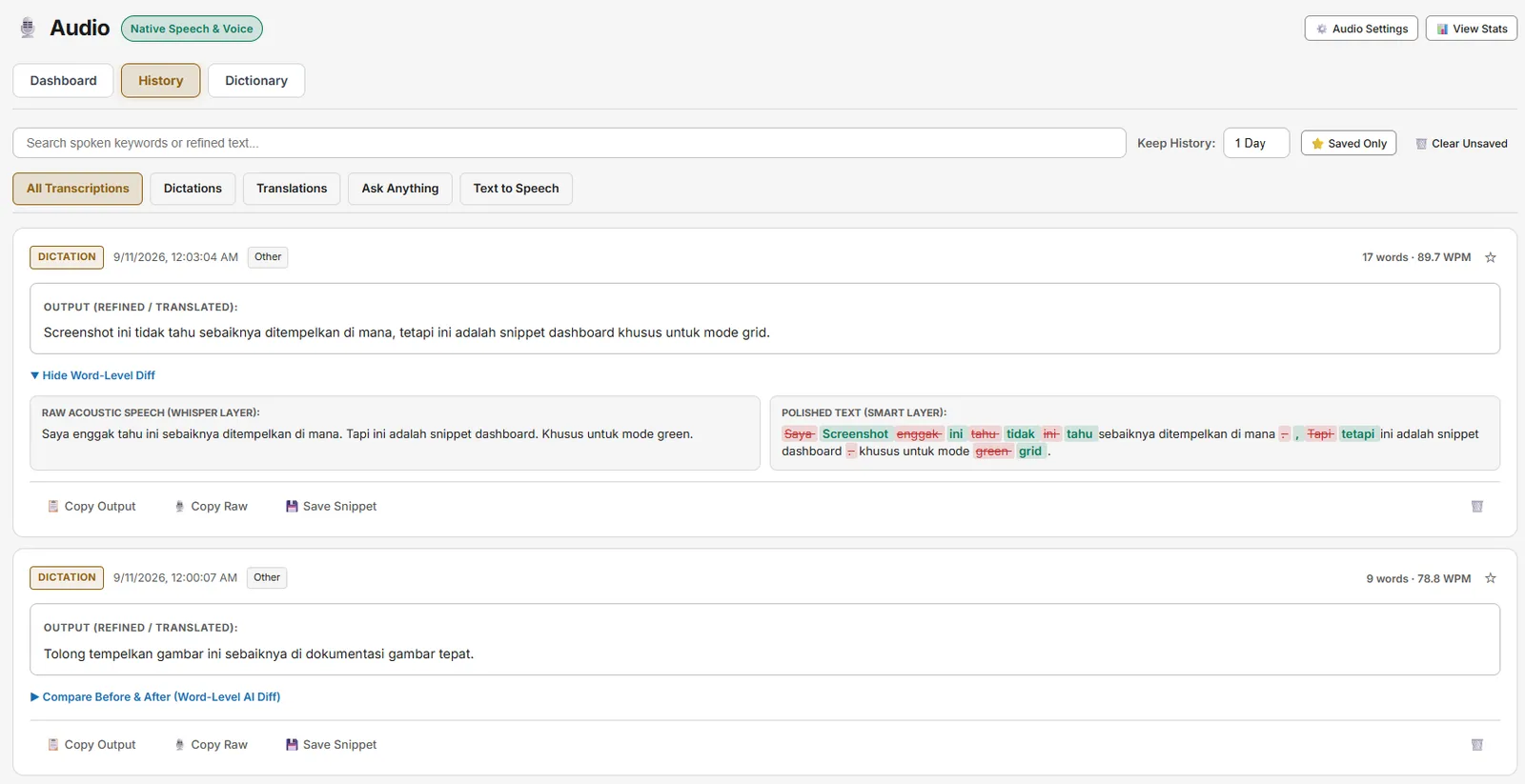
Snipset features an intelligent background feedback loop that learns from how you edit dictated or translated text:
- 12-Second Edit Window (clamped 3 to 60 seconds): Following dictation or voice translation, Snipset observes manual keyboard edits and backspaces in the target application (up to a 12-second observation deadline by default, or until Enter/Tab/Escape submission). The window is configurable between 3 and 60 seconds.
- Real-Time Edit Rate Evaluation: Calculates the Levenshtein edit distance between the inserted text and your finalized text. Ordinary continuations (pure typing appends) are excluded from error rates.
- Pending Dictionary Proposals: When you manually correct a misrecognized or mistranslated term, Snipset records a pending suggestion in your Speech Dictionary queue, isolated by scope (dictation vs. target translation language). Suggestions remain inactive until explicitly approved.
Floating Speech Overlay HUD
When recording, an unobtrusive floating HUD appears over your screen:
- Live VU Meter & Waveform: Real-time visualization of your microphone input level.
- State Indicators: Visual feedback for Listening, Transcribing, Synthesizing, and Editing.
- AI Response Card with TTS: In Ask Anything mode, view the streaming AI response card with dedicated Play, Pause, Resume, Stop, and Copy buttons.
- Audio Feedback Soundpacks: Optional audio cues (soft chimes) confirming when recording starts, stops, or succeeds.
You can reposition the floating speech overlay HUD anywhere on your desktop by dragging it. Its coordinates are remembered across sessions.
Text-to-Speech (TTS) & Read Aloud
The Read Aloud engine lets you listen to lengthy documents, pull request diffs, emails, or snippets without eyestrain.
Triggering Read Aloud
- Copy Text: Copy the text you want to hear in any window (VS Code, Chrome, Outlook, Notion). Read Aloud reads the text on your clipboard, not the on-screen selection, so a highlight that was never copied is not read. If the clipboard holds no text, Read Aloud speaks a short reminder instead.
- Global Shortcut: Press
CommandOrControl+Alt+R(the settings UI showsAlt+Ias a placeholder), or your configured hotkey. - Playback Overlay: Control playback (Play, Pause, Resume, Stop) from the HUD or media hotkeys. Also available as Read Aloud & RSVP Shortcut in Settings → Audio & Voice.
Voice Engines
Read Aloud speaks with the engine chosen in Settings → Audio & Voice → Text to speech engine. System voice is the default and plays through the active WebView (Edge, Chrome, or WebView2) Web Speech API. ElevenLabs sends the text to api.elevenlabs.io with your own API key; the setup steps are in Using ElevenLabs for Text-to-Speech above. The Rust backend exposes a native-speech-synthesis model id whose output today is a fallback waveform used for tests, not end-user speech synthesis. There is no SAPI5, Sherpa-ONNX, Kokoro, or Edge Neural cloud backend wired into Snipset today.
If ElevenLabs cannot read the text (for example a missing key permission, an exhausted quota, or no connection), Read Aloud reads it with a local voice on this device instead. While desktop notifications are on, a notification says why, once per reason until Snipset restarts. This fallback needs at least one voice installed on this device.
| Engine Mode | Description | Latency | Internet Requirement |
|---|---|---|---|
| System voice | Synthesizes speech through the voices installed in your WebView (Edge, Chrome, or WebView2). | Low | Optional (browser-dependent) |
| ElevenLabs | Synthesizes speech on ElevenLabs servers with your own API key, billed per character. | Network | Required |
Voice Profiles & Playback Tuning
- Speed (WPM): Adjust the RSVP teleprompter and Read Aloud rate in words per minute (WPM) from 100 to 600 with the default at 250 WPM.
- Voice Selection: With System voice, pick from the voices installed in your WebView via the Voice dropdown in Settings → Audio & Voice. The available voices depend on your WebView and operating system.
- Curated Voice Profiles: Choose a named profile (Auto, Indonesian Google, Indonesian Device, English Google, English Device) in Settings → Audio & Voice. Every profile that appears is already bound to one concrete voice on your device: profiles whose voice is absent are hidden, and no voice is substituted silently.
- Platform Reality:
Google Bahasa Indonesiaand the other Google voices are network-backed and appear in Chrome, Edge, and Android. Windows WebView2 exposes only the voices installed in your operating system, so the Google profiles do not appear there. The device profiles prefer locally installed voices so playback keeps working offline. On Linux, WebKitGTK asksspeech-dispatcherfor the voice list, so an empty Voice Profile dropdown means that layer is missing rather than that Snipset failed. Install bothspeech-dispatcherandespeak-ng(sudo pacman -S speech-dispatcher espeak-ngon Arch, orsudo apt install speech-dispatcher espeak-ngon Debian/Ubuntu), confirm the layer works withspd-say "Hello", then restart Snipset. This is verified on Arch Linux with KDE Plasma: after installing those two packages the Voice Profile dropdown fills in and Test Voice speaks. Keep in mind that espeak-ng is a formant synthesizer, so it is clearly intelligible but deliberately robotic. It is a reliable offline fallback rather than a natural-sounding voice. - No On-Disk TTS Cache: Re-reading identical text in the same session reuses the Web Speech API utterance queue; there is no persistent on-disk cache for synthesized audio today.
Personalized Speech Dictionary
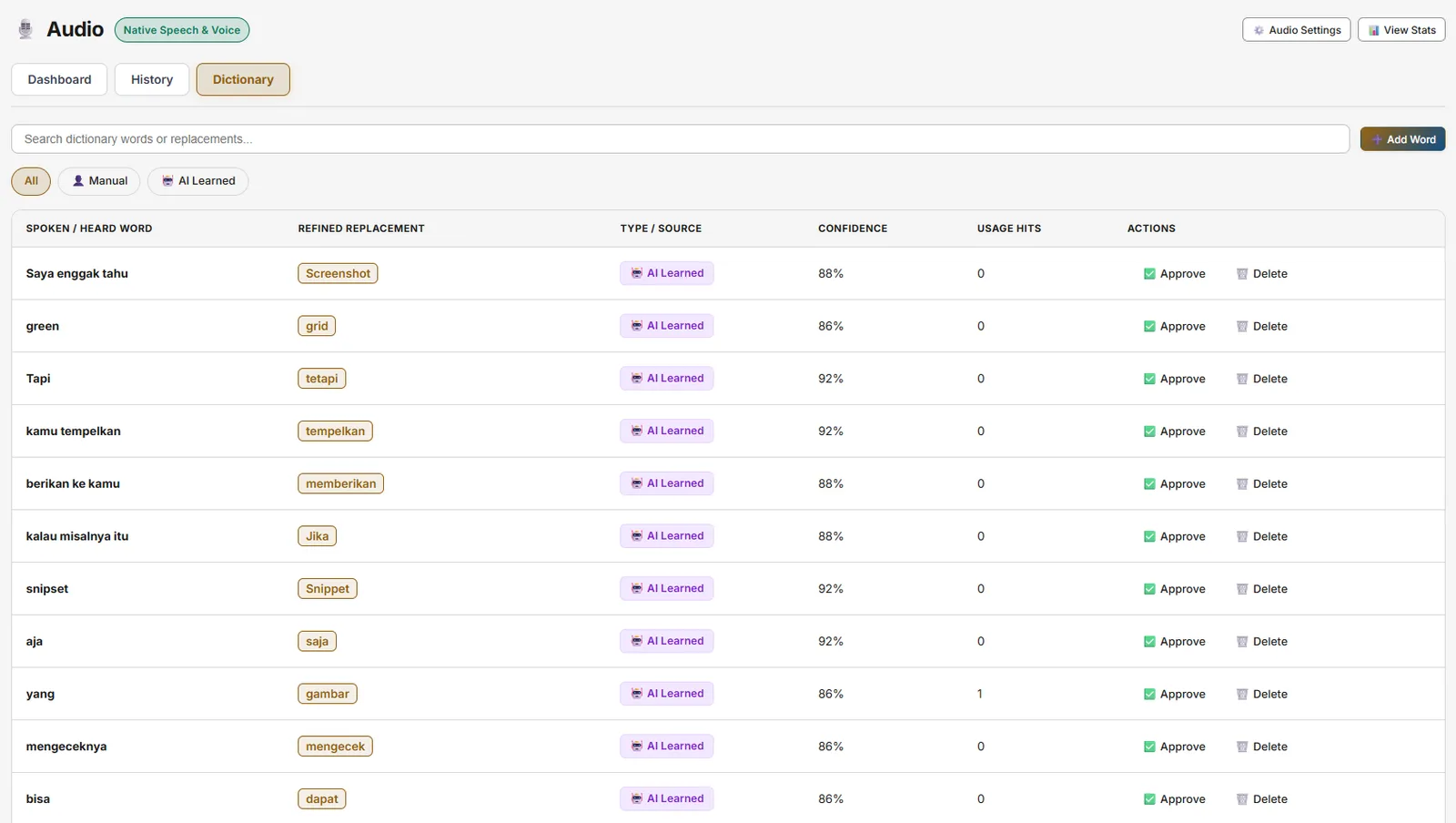
Specialized industry terminology, library names, and code identifiers (e.g., Kubernetes, PostgreSQL, Axios, OAuth2) can sometimes be misheard by general acoustic models.
Snipset provides a Custom Speech Dictionary:
- Open Settings → Audio & Voice → Custom Dictionary (also Settings → Audio & Voice shows Personalized Speech Dictionary).
- Add a Trigger Word (how it sounds) and the Replacement Text (how it should be typed).
- Auto-Dictionary Learning: View learned suggestions generated from your post-hoc keyboard corrections and approve them with a single click.
Hardware Audio Preprocessing
To guarantee optimal accuracy regardless of your environment, Snipset includes built-in DSP (Digital Signal Processing) audio filters:
- Automatic Gain Control (AGC): Dynamically adjusts input volume so whisper-quiet and loud speech are leveled equally.
- Noise Suppression: Removes background HVAC hum, keyboard clicks, computer fans, and ambient room noise.
- Acoustic Echo Cancellation (AEC): Prevents audio coming from your desktop speakers from triggering microphone loops.
- Distance Presets:
- Laptop / Webcam Mic: High-gain profile tuned for distance (1–2 meters).
- USB / Headset Mic: Low-gain, close-proximity profile optimized for clarity.
Performance & Hardware Requirements
Speech-to-text is designed to run entirely on your CPU, and no dedicated GPU is required. Knowing what each layer costs helps you set the right expectations on older machines:
- Local Whisper (bundled model): The offline
ggml-base-id-q8_0model runs on the CPU and needs roughly 300 MB of memory to operate. Any modern x86-64 processor transcribes short utterances in a few seconds; on older dual-core laptops, expect the upper end of that range. Snipset maps CPU threads automatically, so there is nothing to tune. - Layer 2 refinement (optional, needs Ollama): "Smart" dictation, translation, and Ask Anything use a local Ollama model as a second layer for cleanup, formatting, and answers. If Ollama is not installed, dictation still completes and returns your Layer 1 transcript, translation returns the untranslated text, and Ask Anything reports that local AI is offline. Install Ollama only if you want these extras; an 8B model additionally needs about 8 GB of free RAM (see the Ollama tutorial for details).
- If processing feels slow: Make sure no unrelated process is bound to port 11434, and check whether a system proxy or security software intercepts connections to
localhost, because both can turn "Ollama is absent" into long waits. On Windows, audio is captured through the WebView (unlike the native capture path on Linux), so keep your audio drivers current. - Diagnosing with logs: Processing-time telemetry is written to the log file. On Windows:
%LOCALAPPDATA%\Snipset\logs\snipset.log(Settings also has an "open log folder" action). Attaching theSPEECHlines when you report slowness makes the cause obvious.
Troubleshooting Slow Processing
If dictation processing regularly takes longer than a few seconds:
- Check whether Ollama is installed and actually running (
ollama --versionin a terminal). Without it, Layer 2 refinement cannot answer; with it, models load on first use, so the very first request is the slowest. - Open the log file while reproducing the slowness. On Windows:
%LOCALAPPDATA%\Snipset\logs\snipset.log; on Linux:~/.local/share/Snipset/logs/snipset.log. TheSPEECHlines carry a timing JSON (refine_ms,discovery_ms,vision_probe_ms,wait_ms) that names the slow stage directly. - Check whether a system proxy or security software intercepts connections to
localhost, and whether another process is bound to port 11434. Both turn "Ollama is absent" into long waits. - Attach the
SPEECHlines when you report the issue. They contain timing data only, never audio or transcript content.
Privacy, Security & Data Retention
Snipset keeps speech data on your device by default. STT runs locally via Whisper (whisper-rs + ggml-base-id-q8_0.bin) and reaches an external server only when you opt into the Gemini Cloud provider with your own API key. TTS with System voice uses your WebView's speech synthesis: the network-backed Google voice profiles connect to the browser vendor to stream voice data, while the device profiles stay fully offline. TTS with ElevenLabs sends the text you read aloud to api.elevenlabs.io using your own API key, which stays in your system keychain.
- Zero Cloud Recording for STT: When using the bundled local Whisper model, audio never leaves your local machine.
- Gemini Cloud is opt-in: Only when you select the Gemini provider and store a credential is audio sent to Google for Smart transcription, and local Layer 2 is skipped by default. The credential lives in the OS keyring or encrypted storage, never in the plaintext database. You can return to Whisper Offline at any time.
- Retention Policies: Configure automatic audio file purge rules: 1 Day, 1 Week, 1 Month, 1 Year, or Forever. Default is 1 Day.
- Local-only Storage: Voice history records and temporary WAV files live in your private app data directory. They are not encrypted at rest; only clipboard entries and one-time-password secrets are protected with DPAPI today.
- One-Click Purge: Delete all cached audio recordings instantly via Settings → Audio & Voice → Purge All Recordings (and per-entry purge in Speech History).
Configuration Reference
| Configuration Key | Type | Default | Description |
|---|---|---|---|
shortcut_dictate | String | CommandOrControl+Alt+D | Global shortcut to start/stop Speech-to-Text dictation. |
shortcut_translate | String | CommandOrControl+Alt+T | Global shortcut to start/stop Live Voice Translation. |
shortcut_ask_anything | String | CommandOrControl+Alt+A | Global shortcut to start/stop Voice AI Ask Anything. |
shortcut_read_aloud | String | CommandOrControl+Alt+R | Global shortcut to trigger Text-to-Speech Read Aloud. |
active_model_id | String | whisper-tiny-gguf | Active acoustic speech recognition model. The bundled runtime uses the ggml-base-id-q8_0.bin model file. |
stt_provider | String | local | Speech-to-Text provider: local (offline Whisper, default) or gemini (opt-in cloud, sends audio to Google). |
enhance_with_layer2 | Boolean | false | When true, the Gemini cloud path is polished again with local Layer 2 (tone and visual context). |
visual_context_enabled | Boolean | false | When true, Layer 2 receives a screenshot of the active window. It is sent to the configured Ollama endpoint, which may be a cloud model. |
inference_language | String | auto | Spoken language hint for dictation. Supported values today: auto, id, en. |
translation_target_lang | String | id | Target language when using Live Voice Translation. Supported values today: en, id. |
personalization_enabled | Boolean | true | Enable post-insert correction proposals and adaptive vocabulary. |
auto_gain_control | Boolean | true | Browser-level automatic volume gain normalization. |
noise_suppression | Boolean | true | Browser-level background noise filter. |
echo_cancellation | Boolean | true | Browser-level acoustic echo cancellation. |
mic_gain_boost | Number | 1.0 | Software mic gain multiplier (1.0x to 3.0x, capped at 1.5x when AGC is on). |
tts_rsvp_wpm | Number | 250 | Read Aloud and RSVP playback rate in words per minute (100 to 600). |
soundpack | String | modern_chime | Audio feedback soundpack (modern_chime, minimal_click, soft_pop, silent). |
observation_window_secs | Number | 12 | Post-insert edit observation window in seconds (clamped 3 to 60). |
retention_period | String | 24_hours | Time to keep WAV files before automated cleanup (24_hours, 1_week, 1_month, 1_year, never). |