AI Integration
AI Snippet Generation
Use AI to automatically build and format your snippets.
AI Snippet Generation bridges the gap between AI Chat and your snippet library. Instead of manually crafting a snippet from scratch, you describe what you need, and the AI generates a ready-to-save snippet, complete with a suggested keyword and description.
How It Works
When you ask the AI to "create a snippet" in the AI Chat, it doesn't just reply with raw text. It responds with a structured, visual Snippet Card.
Saving a Generated Snippet
- Click Save Snippet On the AI-generated preview card in the chat, click the "Save Snippet" button.
- Review the Details The Snippet Editor dialog opens, pre-filled with all the AI's suggestions. You can edit any of these fields before saving.
- Confirm and Save Once you are happy with the content and the keyword, click Save. The snippet is immediately added to your library and ready to trigger.
AI Creator Overlay Menu (Ctrl+Shift+Space)
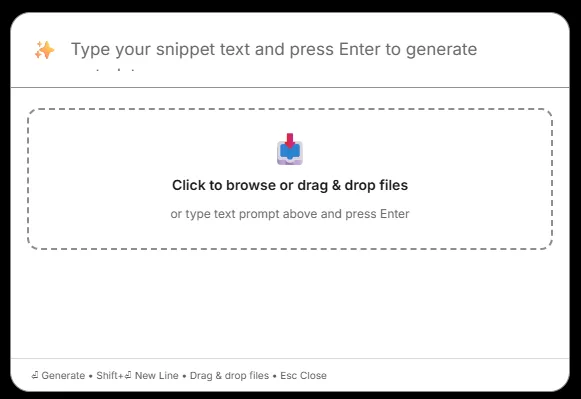
For even faster snippet creation without opening the main window or switching to AI Chat, use the dedicated AI Creator Menu:
- Global Shortcut: Press
Ctrl+Shift+Spacefrom anywhere in Windows (customizable in Settings → Expansion & Shortcuts → Global Shortcuts). - Prompt Input: Type what kind of snippet or text you want generated, or paste existing raw content to generate keywords, name, and metadata automatically.
- Drag & Drop Attachments: Click to browse or drag and drop reference documents, images, code snippets, or notes directly into the dropzone to incorporate them into the generated snippet.
- Instant Generation: Press
Enterto generate your new snippet. PressShift+Enterfor multi-line prompts, orEscto dismiss.
Auto-Group Creation
The AI might suggest a logical group for your new snippet. If it suggests a group name that doesn't currently exist in your library, Snipset makes it easy:
- Example: The AI suggests putting it in a group called "Support Replies".
- When you open the save dialog, Snipset will show a prompt: "Create group 'Support Replies'?"
- If you accept, Snipset will create the group and assign the snippet to it in one single action.
Duplicate Keyword Warning
- Manually change the keyword to something unique.
- Overwrite the existing snippet entirely.
- Save it anyway, which will prompt you to resolve the conflict later.
Prompting Tips for Better Snippets
You get better results when you give the AI clear constraints. Try these techniques:
| Technique | Example Prompt |
|---|---|
| Be specific about context | "Create a snippet for a polite follow-up email to a client who hasn't responded in 5 days." |
| Enforce keyword formatting | "Use the keyword prefix `//` for this snippet, like `//followup`." |
| Specify tone | "Make the tone professional but warm, and do not use any emojis." |
| Ask for variations | "Create 3 variations of this snippet in different tones: formal, casual, and urgent." |